
7-Bedrock
October 24, 2023
Solved

Skipping the 30-day test version to get Express version right away

  • October 24, 2023
  • 2 replies
  • 1795 views
Hello, some time ago I downloaded a test version of Mathcad Prime 7.0, which then after 30 days got downgraded to the free Express version. Since then I had to reinstall my operating system, and now would like to install Mathcad Express once again. However, when using the installation file I saved, I only have the option to install the 30-day test version of Mathcad, which I'm unable to do, because the account I use already used its 30-day trial version tied to it. Is there a way to skip this test version and instead simply install the Express version right away?
Best answer by RS_10161811

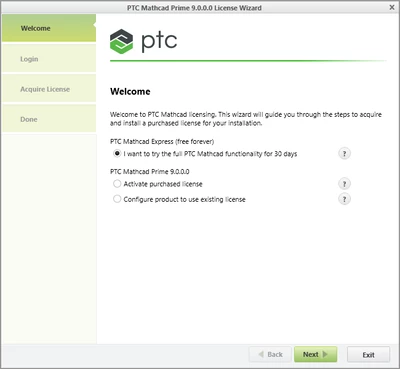
After picking this option 

1.png

an information appeared that test version had already been used, but thanks to your reply I realized just now that it's not necessary to choose and press "Next" in this window. Pressing "Exit" leaves Mathcad in Express version, and it is indeed installed on my PC now. Thank you!

2 replies

18-Opal
October 24, 2023

Hi


Just get a new file using another email address to get a new down load.  Run the install. If it recognise the machine as having used the trial it will go to express else you get another free trial which will revert to express as it times out.


From https://support.alfasoft.com/hc/en-us/articles/9727655437597-Installing-PTC-Mathcad-Prime-9-0


ppal_0-1698191881714.png


7-Bedrock
October 25, 2023

Thank you for your reply, but this is precisely the solution I want to avoid (having many unnecessary accounts 😀

23-Emerald IV
October 25, 2023

Are you saying it doesn't want to install (gives an error message and quits, or something like that)?

I should think you can install Prime, no matter what type of installation it is. As long as you do not apply for a license ( either a full license or a trial license) the program should work, in Express mode.


Success!

Luc

RS_101618117-BedrockAuthorAnswer
7-Bedrock
October 25, 2023

After picking this option 

1.png

an information appeared that test version had already been used, but thanks to your reply I realized just now that it's not necessary to choose and press "Next" in this window. Pressing "Exit" leaves Mathcad in Express version, and it is indeed installed on my PC now. Thank you!