
13-Aquamarine
January 2, 2025
Solved

AMU - How to load the custom mashup with AMU container with Navigation

  • January 2, 2025
  • 1 reply
  • 1988 views

Hello Alll,

Using this approach, I was able to get master mashup on top but Left side menu bar is not visible, please refer attached snapshot.


Use Case: I have a custom page, where on click of a button I want to Navigate Alarm Events page (under Operations, main menu). I need the consistent navigation.


Please let me know if there is any workaround to have side navigation as well.

Best answer by mstarnaud

Hi Javed


I will udpate the other post with the missing piece once we finally finish making it work. I did some debugging and I'm writing some notes here, I'm currently still in the debugging process.


The top-left "squares" button still appears, and it does bring you back to the main menu. So you should still have access to the menu functionality, but I understand that it can be less appealing than the left panel.


First, how it works in the "normal" way : the menu is in Mashup PTC.FSU.COREUI.MenuConfiguration.MasterContainer_MU, it gets the menu items from service PTC.FSU.CORE.MenuConfiguration.Utils_TG.GetMenuConfigurationSideMenu_MNC, using parameter SolutionName which in this case is "AMU" (and Enabled is set to true).


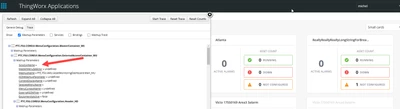
The process is similar with the custom navigation method : the menu is inside Mashup PTC.FSU.COREUI.MenuConfiguration.ExternalAccessContainer_MU and it should call the same service. The SolutionName parameter comes from a Mashup parameter, so in the Navigation function (when we click on the button), we would need to add the name, in this case it's "AMU". I would need to add this to my solution in the other post. This should work... except it doesn't and I don't know why yet. For a reason I haven't figured out yet, the SolutionName gets removed, even if we set it in the Navigation : 
mstarnaud_0-1736195805045.png

And because the SolutionName is empty, it doesn't get the menu. Note about this : in the Mashup, the service is called on a Validator condition : The GetSideMenuTrigger Validator says that if there is a solution name then it calls the menu service, otherwise it doesn't.


I'll try to reach a more knowledgeable team to see if they can help me with this. But they are very busy this week so it may take longer.


1 reply

mstarnaud16-PearlAnswer
16-Pearl
January 6, 2025

Hi Javed


I will udpate the other post with the missing piece once we finally finish making it work. I did some debugging and I'm writing some notes here, I'm currently still in the debugging process.


The top-left "squares" button still appears, and it does bring you back to the main menu. So you should still have access to the menu functionality, but I understand that it can be less appealing than the left panel.


First, how it works in the "normal" way : the menu is in Mashup PTC.FSU.COREUI.MenuConfiguration.MasterContainer_MU, it gets the menu items from service PTC.FSU.CORE.MenuConfiguration.Utils_TG.GetMenuConfigurationSideMenu_MNC, using parameter SolutionName which in this case is "AMU" (and Enabled is set to true).


The process is similar with the custom navigation method : the menu is inside Mashup PTC.FSU.COREUI.MenuConfiguration.ExternalAccessContainer_MU and it should call the same service. The SolutionName parameter comes from a Mashup parameter, so in the Navigation function (when we click on the button), we would need to add the name, in this case it's "AMU". I would need to add this to my solution in the other post. This should work... except it doesn't and I don't know why yet. For a reason I haven't figured out yet, the SolutionName gets removed, even if we set it in the Navigation : 

mstarnaud_0-1736195805045.png

And because the SolutionName is empty, it doesn't get the menu. Note about this : in the Mashup, the service is called on a Validator condition : The GetSideMenuTrigger Validator says that if there is a solution name then it calls the menu service, otherwise it doesn't.


I'll try to reach a more knowledgeable team to see if they can help me with this. But they are very busy this week so it may take longer.


javed_a13-AquamarineAuthor
13-Aquamarine
January 7, 2025

Thanks @mstarnaud for detailed explanation, it helps in understanding the flow.


I will wait for your final input, meanwhile I will try at my end as well. 


16-Pearl
January 8, 2025

The people I reached to, who are more experienced than me in making custom Mashups, have told me that they use the same method as us and run into the same issue of the missing left menu panel. But they ignore the issue, as the top panel is present and the menu is accessible by using the button at the top-left.


I have raised this issue to the software team : PSPT-79894. I will try to update this if/when this gets fixed.