
16-Pearl
April 3, 2020
Solved

Asset advisor performance charts not reflecting asset status history

  • April 3, 2020
  • 2 replies
  • 3743 views

For some reason, the performance charts do not reflect the asset status history anymore.
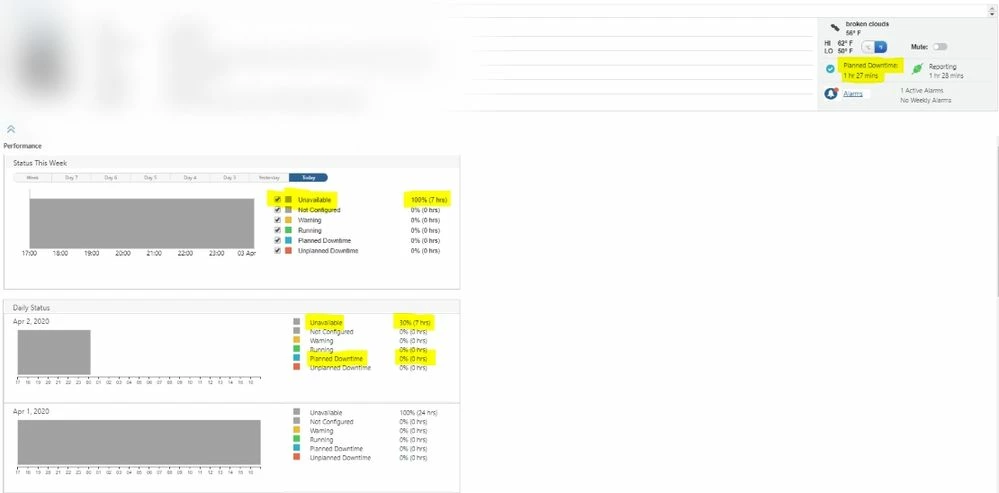
Thingworx - 2020-04-03 - Performance chart not updating - 1.png.jpg


The expressions for the asset are set programatically during asset provisioning as follows:


Things[UserInputSerialNumber].EXP_E_Running = "\"" + UserInputSerialNumber + ":AssetStatus\"=2";
Things[UserInputSerialNumber].EXP_E_NotConfigured = "false";
Things[UserInputSerialNumber].EXP_E_Unavailable = "true";
Things[UserInputSerialNumber].EXP_E_PlannedDowntime = "\"" + UserInputSerialNumber + ":AssetStatus\"=4";
Things[UserInputSerialNumber].EXP_E_UnplannedDowntime = "\"" + UserInputSerialNumber + ":AssetStatus\"=3";
Things[UserInputSerialNumber].EXP_E_Unavailable = "\"" + UserInputSerialNumber + ":AssetStatus\"=5";


When the property "AssetStatus" is updated, the property "statusTimestamp" is also updated with the current datetime.


Am I missing something? 

Best answer by Willie

Hi @slangley 


The case # is C15366984.

I was able to get the correct status value.  It seems that I had the expressions for 2 statuses swapped, causing unexpected status outcomes.  I am now also using CalculateStatus instead of manually setting the status and statusTimestamp values.  I have a new issue where I'm not able to edit the expression for state "5" which is "Unavailable".  This is also in C15366984.

2 replies

Willie16-PearlAuthor
16-Pearl
April 7, 2020

Additional information:


When I update the status, I update the following properties:

AssetStatus

status

statusTimestamp


Example:

Things[thingname].AssetStatus = 4;

Things[thingname].status = 4;  //I update this manually so that the asset advisor status reflects the asset status immediately instead of waiting for asset advisor to scan the expression for the status and update the status.

Things[thingname].statusTimestamp = new Date( );

5-Regular Member
April 8, 2020

Hi @Willie 


The status expressions are evaluated in the order that they appear in the table. The first expression to evaluate to true determines the state of the equipment. Could you please change the order of the status expression. I could see that from the above post that unavailable status is above the PlannedDowntime.  Additionally, could you please verify the value of properties Status, StatusTimestamp and EXP_E_PlannedDowntime from composer.


Thanks

Abhishek

Willie16-PearlAuthor
16-Pearl
April 8, 2020

Hi @abhkumar_274615 


I just removed some extra lines that were unnecessary.


*******new set of lines to set properties for status expressions******

Things[UserInputSerialNumber].EXP_E_Running = "\"" + UserInputSerialNumber + ":AssetStatus\"=2";
Things[UserInputSerialNumber].EXP_E_PlannedDowntime = "\"" + UserInputSerialNumber + ":AssetStatus\"=4";
Things[UserInputSerialNumber].EXP_E_UnplannedDowntime = "\"" + UserInputSerialNumber + ":AssetStatus\"=3";
Things[UserInputSerialNumber].EXP_E_Unavailable = "\"" + UserInputSerialNumber + ":AssetStatus\"=5";

********************************************************************************

This doesn't affect the issue I'm having though.  Also, I don't think the order of the properties I set during asset provisioning affects the order they appear in the table.  The order they appear in the table is set by default.  Please see below:


Thingworx - 2020-04-08 - Status definition mashup.PNG


The issue I'm having is not specific to "Planned Downtime" status.  Regardless of what the current status is, the performance chart does not update anymore.  The properties status, statusTimestamp, and the expressions all have the correct values; however, the status and statusTimestamp do not reflect these values.

Support
April 20, 2020

Hi @Willie.


Please let us know the case number so we can track it for updating this post once a solution is known.


Regards.


--Sharon

Willie16-PearlAuthorAnswer
16-Pearl
April 20, 2020

Hi @slangley 


The case # is C15366984.

I was able to get the correct status value.  It seems that I had the expressions for 2 statuses swapped, causing unexpected status outcomes.  I am now also using CalculateStatus instead of manually setting the status and statusTimestamp values.  I have a new issue where I'm not able to edit the expression for state "5" which is "Unavailable".  This is also in C15366984.

16-Pearl
April 28, 2020

Hi @Willie ,

Unavailable expression is not editable as per the product design

As per the status functionality, anyone of the asset status should be true for displaying asset status in asset advisor. In case if none of the above expressions are true, then asset status will be Unavailable (Hardcoded 5 to true) and this will be evaluated in the last when all OOTB and custom expressions gets evaluated.


Thanks,

Himanshu


If the above response has answered your question, please mark as Accepted Solution, for the benefit of others who may have the same question.