
1-Visitor
February 12, 2021
Solved

Browsing Kepware channels from a mashup

  • February 12, 2021
  • 2 replies
  • 2368 views

Greetings.

I'm trying to create a mashup that allows me to browse Kepware channels and items, like the Discover tab from the industrial thing page on the composer.
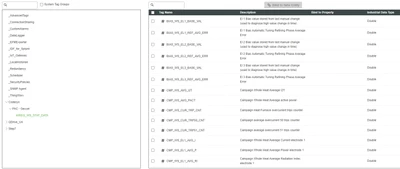
aiGreek_0-1613118626524.png


I have created "custom" versions of the BrowseItems and BrowseGroups services that allow me to choose an IndustrialGateway to execute said services on the Kepware chosen on the mashup. Their output an infotable with the same Data Shape as their "stock" versions.

I'm trying to use a tree widget to display the channel structure like in the screenshot above, but I cannot find a way to do so correctly. I can display the root and the first levels of the tree (although not in the way I expect):
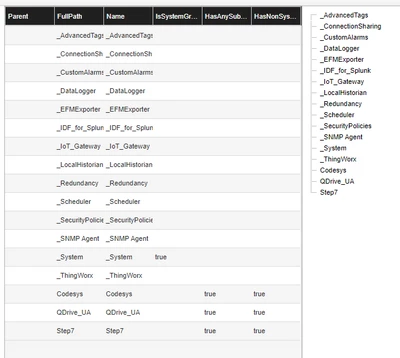
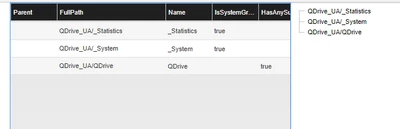
brave_qRzlzMHdrV.png 

brave_dGDR0p9zNS.png

but when I try to go deeper into the structure the tree just disappears:

aiGreek_2-1613119640133.png


I've tried to use my custom service to change dots into slashes for the FullPath rows, but it didn't help.

Any suggestions?
Thank you for your time.

Best answer by c_lowy

Hi @aiGreek,


Please find attached some example entities and data for a TreeGrid Advanced that displays 3 levels : 

  • Entities_TreeGrid.xml (1 DataShape + 1 DataTable + 1 Mashup)
  • data-0.twx (unzip data-0.zip, content of above mentioned DataTable)

I hope that this can help you with your use case by comparing your data / widget configuration / bindings with this example one.

2 replies

c_lowy16-PearlAnswer
16-Pearl
February 17, 2021

Hi @aiGreek,


Please find attached some example entities and data for a TreeGrid Advanced that displays 3 levels : 

  • Entities_TreeGrid.xml (1 DataShape + 1 DataTable + 1 Mashup)
  • data-0.twx (unzip data-0.zip, content of above mentioned DataTable)

I hope that this can help you with your use case by comparing your data / widget configuration / bindings with this example one.

aiGreek1-VisitorAuthor
1-Visitor
February 17, 2021

Thank you @c_lowy, I'll give it a look!

Community Manager
March 9, 2021

Hi @aiGreek.


If you feel the response from @c_lowy answered your question, please mark it as the Accepted Solution for the benefit of others with the same question.


Regards.


--Sharon