1-Visitor
March 12, 2018
Solved

Cannot install ThingWorx MFG App.

  • March 12, 2018
  • 2 replies
  • 9061 views

Dear All,


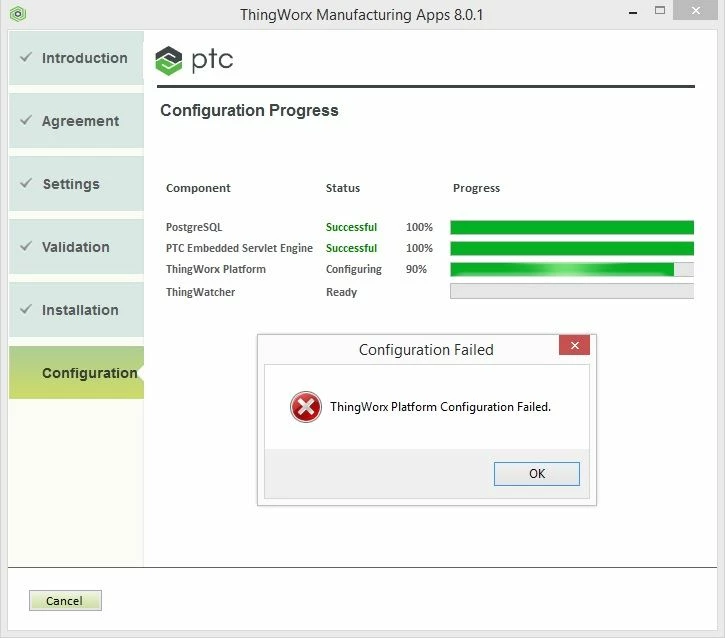
After I uninstall MFG App, I cannot install it anymore. The error message show in the picture below. I have tried to restart services in Thingworx Server but it dose not work. Could you please advise me for the solution.


ThingWorx MFG App error.jpg


Best Regards,

Nuttaphon

Best answer by slangley

Hi @Nuttaphon.


Once the license expires for the freemium/dev kit, you have the following choices:


1) Install the freemium/dev kit on a different Windows machine--one that was not previously used for ThingWorx Manufacturing Apps.

2) Reinstall your o/s to remove the ThingWorx Manufacturing Apps artifacts and then reinstall ThingWorx Manufacturing Apps.

3) Purchase an entitlement to ThingWorx Manufacturing Apps.  The temporary license delivered with the freemium/dev kit versions can then be replaced with the commercial license without the need to reinstall the product.


If my response has answered your question, please mark as Accepted Solution, for the benefit of others who may have the same question.

2 replies

16-Pearl
March 12, 2018

Greeting @Nuttaphon,


To troubleshoot the problem, we will need to confirm the following:

1) What is the Windows operating system you are using for this installation?
2) Are the .NET 3.5 and 4.5 Frameworks installed?
3) Which version of Manufacturing apps was installed on this machine previously?


Thanks,

Himanshu

Nuttaphon1-VisitorAuthor
1-Visitor
March 15, 2018

Dear Himanshu,


Please see my answer below.


1) What is the Windows operating system you are using for this installation?

- Windows 8.1 Pro 64bit.
2) Are the .NET 3.5 and 4.5 Frameworks installed?

- Yes.
3) Which version of Manufacturing apps was installed on this machine previously?

- MFG 8.0.1


However, I need to reinstall same version again after uninstall it but it cannot install anymore.


Could you please advise me for the solution?


Best Regards,

Nuttaphon

16-Pearl
March 15, 2018

Greetings @Nuttaphon,


Please check the PostgreSQL install log located at <Install directory>\ThingWorxManufacturingApps\Factory-Installer.log:

If you are getting the following error in the logs:

Failed to load SQL modules into the database cluster

Please try the below steps :

1)    Manually create a data folder outside of Program Files\PostgreSQL9.40\data in the root partition
2)    Assign full control permissions to Everyone
3)    Re-run the install selecting the data folder created in step 1 above
    
Please note Freemium edition license remains valid for 30 days only. If your license is expired, no ThingWorx instance will start without a paid license.
Freemium apps (Express and Developer) can be installed on a clean Windows operating system only (no previous installs for ThingWorx or Freemium apps)


Thanks,

Himanshu

5-Regular Member
March 12, 2018

Greetings @Nuttaphon,


I can see you are currently trying to install ThingWorx Manufacturing Apps 8.0. The current release (8.2) features additional functionality and improvements-- including installer fixes-- implemented since the 8.0 release. You may find it is best to download and install ThingWorx Manufacturing Apps 8.2 (either Express or Dev Kit). Links to these downloads can be found here:


Getting Started with the ThingWorx Manufacturing Apps Community


If you are certain you would rather continue with the 8.0 install, follow up on the questions posed by Himanshu to proceed with troubleshooting that version.


Please let us know what you decide, and how it goes.


Best regards,

Steven M