
Solved

Hi
Shift Events absolutely need both the date and the time. If you have 3 shifts per day, then you will have 21 shift events in your week and you must import all 21 records. For a year that's 1095 records.
In Excel, here's an example on how to do this :
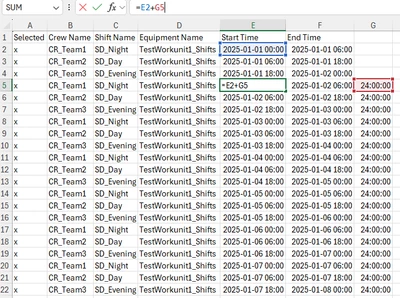
- Write example dates & times for your pattern. In my example, I filled the start & end times of my 1st day (3 shifts per day, so 3 records).
- For all following records : in an extra column to the right, write just the time portion that you want to add from the previous records. For example to add 24h (next day), then write 24:00:00 in the extra column.
- For all following records : the time will be [cell containing the pattern's time] + [cell containing the time to add]. In my example, the E5 cell's formula is =E2+G5. You can use similar methods to fill the shift & crew columns (in my example, C5's formula is =C2).
- Use the little "expand" button at the bottom-right of the cells to quickly copy these formulas for as long as you want.
- Pay attention to the days when there will be a daylight saving change, confirm if you need to change the time when you reach those days.
What most people do is they fill the data for the entire year, then set a reminder in early December to do it for the following year. Also most people only do it for a few of their top-level equipments, since their children will inherit from the parents : most people do it at the factory-level equipment(s).
And as a reminder, there must be no gap in your records. If your shift change is at 08:00, then the previous shift ends at 08:00 (not 07:59) and the next starts at 08:00. And if there is a shift where no work will be done, you must still fill it with data but you can use different shifts & crews, like NoShift & NoCrew instead of Night & Team1.
Enter your E-mail address. We'll send you an e-mail with instructions to reset your password.