
10-Marble
November 9, 2017
Solved

Performance Calculation for a Line Resource

  • November 9, 2017
  • 1 reply
  • 4607 views

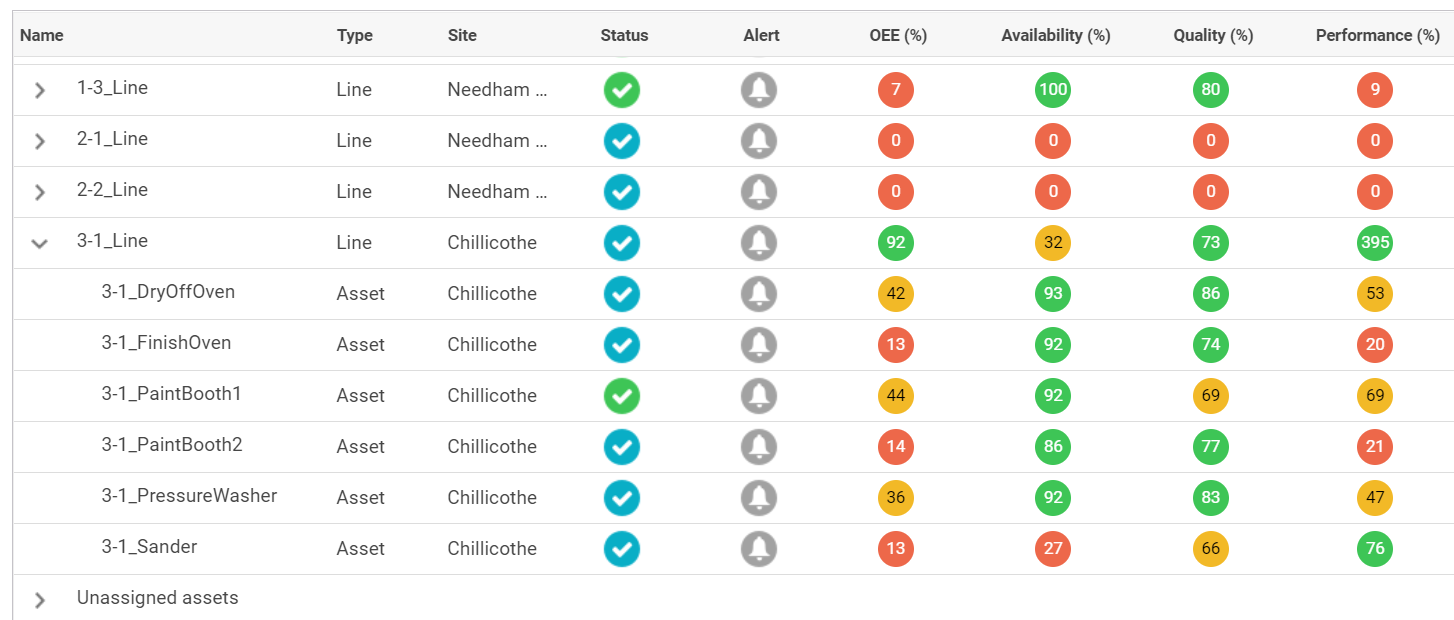
For a Line resource "3-1_Line", I have configured the Status to be that of the "bottleneck" Asset resource - "3-1_PaintBooth2" and part counts to come from the final Asset in the line "3-1_FinishOven"..  The availability for the line is less than the asset since it was configured later and the part counts match up well for quality - 73% vs. 74%.  Not sure why I get a 395% performance value though for the line?????  Shouldn't the line performance value be based on the configured part counts and ideal run rate?
Best answer by vranganathan

Your configuration looks correct. The actual formula used is Performance = (Total Count / Run Time) / Ideal Run Rate. I am not sure where they are reading Run Time from, I suspect they are using Line value. I believe you want to use your bottle neck Run Time Value. I am not sure how to achieve this in the UI. However you can override the CustomizedPerformanceCalculation service  in PTC.Factory.StatusExpressionResourceProvider. It takes ThingId and ootb calculated value as input.

Thanks,

Varathan

1 reply

12-Amethyst
November 9, 2017

John,

What is the Performance Metrics Configuration you have at Line level?

Thanks,

Varathan

jristey10-MarbleAuthor
10-Marble
November 9, 2017

For the line, I have configured the same as the final Asset in the line:

12-Amethyst
November 9, 2017

Your configuration looks correct. The actual formula used is Performance = (Total Count / Run Time) / Ideal Run Rate. I am not sure where they are reading Run Time from, I suspect they are using Line value. I believe you want to use your bottle neck Run Time Value. I am not sure how to achieve this in the UI. However you can override the CustomizedPerformanceCalculation service  in PTC.Factory.StatusExpressionResourceProvider. It takes ThingId and ootb calculated value as input.

Thanks,

Varathan