
1-Visitor
Oct 14, 2019 10:06 AM UTC
Solved

The default status configuration error from PhysicalAssetThingTemplate

Hello,


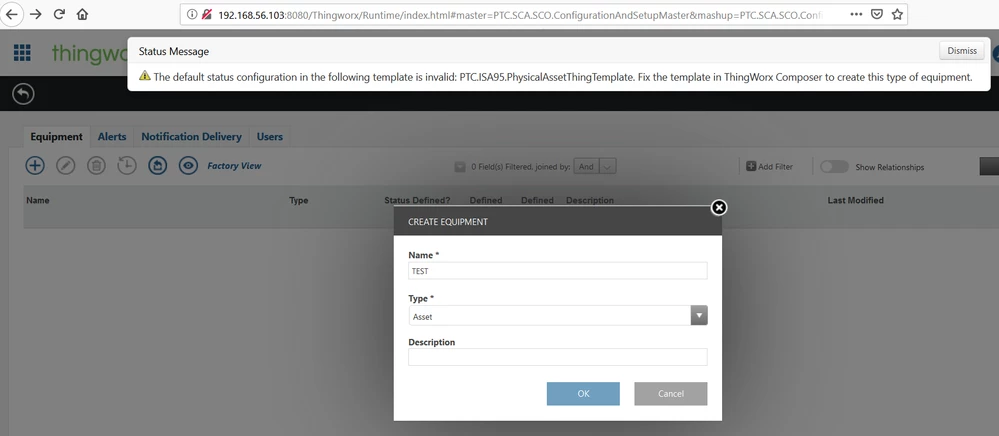
As shown in attached image, I am trying to add an asset in the Asset advisor Configuration page. But I am getting the error as shown in the pic. I tried editing the PhysicalAssetThingTemplate template but it is not editable as it is from the extension. Am I missing out something here?

But I have no problem in doing the same in older version of Thingworx.

Current Version: 8.5.0-b12.


Thanks in advance.Error Message.png
vineshAnswer
1-Visitor
Oct 30, 2019 1:26 PM UTC

SOLUTION:


I had missed out the "Post Import Database Configurations" steps as given in the https://support.ptc.com/help/thingworx_apps/r8.5/en/#page/thingworx_apps%2FThingWorxAppsSetupConfig%2Fimporting_the_thingworx_apps_extension.html%23.


Upon performing those steps, there was no such warnings,

6 replies

5-Regular Member
Oct 14, 2019 11:52 AM UTC

Hi,

Go to Thingworx Composer and run the service CreateTables for the thing PTC.SCA.SCO.DatabaseManager. After execution of this service, try the equipment page again.


Thanks,

Himesh Rajpal

Translate
vinesh1-VisitorAuthor
1-Visitor
Oct 14, 2019 12:31 PM UTC

Thanks for the quick reply. I tried doing what you said but got error. here is the scrip log details:

1. Error in: PTC.SCA.SCO.DefaultStatusManager.ReloadStatusDefinitions javascript service 

2. com.thingworx.dsl.exceptions.DSLRequestProcessingException: Execution error in service script [ValidateDefaultStatusExpressionsByTemplate] :: An error has occurred. Contact your administrator for further details. 


Everything works fine till 8.4 update. The problem is only in 8.5.


Translate
vinesh1-VisitorAuthor
1-Visitor
Oct 14, 2019 12:59 PM UTC

Also to mention, I have carefully added the relavent extension package for 8.5. I have followed the instructions as given by PTC to import the Thingworx Manufacturing apps extension package.

Translate
vinesh1-VisitorAuthor
1-Visitor
Oct 15, 2019 8:26 AM UTC

Looks like there have been some buggy changes made in the 8.5 version of Manufacturing apps extension. As a workaround, I imported the 8.4 version of Manufacturing apps extension to 8.5 version Thingworx and it worked without any issue. I hope I won't face any problems later.

Translate
Support
Oct 24, 2019 3:53 PM UTC

Hi @vinesh.


Just want to make you aware that running ThingWorx Manufacturing Apps 8.4 on ThingWorx 8.5 is not a supported configuration and it is expected that you will experience problems.


Regards.


--Sharon

Translate
vinesh1-VisitorAuthorAnswer
1-Visitor
Oct 30, 2019 1:26 PM UTC

SOLUTION:


I had missed out the "Post Import Database Configurations" steps as given in the https://support.ptc.com/help/thingworx_apps/r8.5/en/#page/thingworx_apps%2FThingWorxAppsSetupConfig%2Fimporting_the_thingworx_apps_extension.html%23.


Upon performing those steps, there was no such warnings,

Translate