7-Bedrock
June 30, 2023
Solved

Thingworx CWC 3.1.1 : How to import the SerialNumbers ?

  • June 30, 2023
  • 1 reply
  • 1364 views

I'm doing the demo case on Thingworx CWC 3.1.1 . and try to import the SerialNumbers
Refer this link :
https://support.ptc.com/help/thingworx_applications_setup/r1.0/en/?_gl=1*6fhmig*_ga*NzY0OTIxOTMuMTY3MzYyOTMyOQ..*_ga_1QBT6P6HR1*MTY4ODEzODcyOC43OS4xLjE2ODgxMzk3NTAuMC4wLjA.*_ga_CBN5QVB9VJ*MTY4ODEzODcyOC4xMy4xLjE2ODgxMzk3NTAuMC4wLjA.#page/applications_setup/Common_Endpoints_Config_SN_Cust_Service.html#

I don't found the Things name and the Service name to import the JSON value
{
"SerialNumbers":["Serial1","Serial2"],
"WorkOrder": "WorkOrder1",
"ErrorCode": 0,
"ErrorMessage": "Success"
}
Please recommend how to import SerialNumbers.

Note: I saw "Job Order Import" using the Things Name : PTC.FSU.CORE.JobOrder.EndPoint_TG
and service name : ImportJobOrder_END from this link and work well

https://support.ptc.com/help/thingworx_applications_setup/r1.0/en/?_gl=1*6fhmig*_ga*NzY0OTIxOTMuMTY3MzYyOTMyOQ..*_ga_1QBT6P6HR1*MTY4ODEzODcyOC43OS4xLjE2ODgxMzk3NTAuMC4wLjA.*_ga_CBN5QVB9VJ*MTY4ODEzODcyOC4xMy4xLjE2ODgxMzk3NTAuMC4wLjA.#page/applications_setup/Common_Endpoints_Config_JOImport_Usage.html#

Thanks you very much,

Best answer by mstarnaud

Hi MP


Serial Numbers are part of the Job Order. So they can be included in the Job Order import endpoint. You can see an example of this here, in this example they have 3 serial numbers. Note that you can also re-run your import and add the missing serial numbers (don't forget to update the quantity accordingly), but be careful keeping the correct information in the other fields like the status.


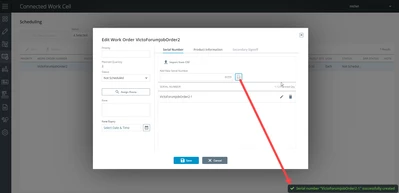
In the CWC - Scheduling screen, we have the list of Job Orders. You can edit one and see & modify its list of serial numbers. You can use the box & button over the list to manually create them : 

mstarnaud_0-1689010327793.png

You'll notice over the list there's also an "Import from CSV" button. This also lets you download a template. It's pretty simple : you get an Excel template file (essentially 1 cell with the word Value) and you can write all your serial numbers under it, save the file and click on the Choose File & Upload buttons. Those serial numbers will be added to the list for that Job Order.

1 reply

mstarnaud16-PearlAnswer
16-Pearl
July 10, 2023

Hi MP


Serial Numbers are part of the Job Order. So they can be included in the Job Order import endpoint. You can see an example of this here, in this example they have 3 serial numbers. Note that you can also re-run your import and add the missing serial numbers (don't forget to update the quantity accordingly), but be careful keeping the correct information in the other fields like the status.


In the CWC - Scheduling screen, we have the list of Job Orders. You can edit one and see & modify its list of serial numbers. You can use the box & button over the list to manually create them : 

mstarnaud_0-1689010327793.png

You'll notice over the list there's also an "Import from CSV" button. This also lets you download a template. It's pretty simple : you get an Excel template file (essentially 1 cell with the word Value) and you can write all your serial numbers under it, save the file and click on the Choose File & Upload buttons. Those serial numbers will be added to the list for that Job Order.