
1-Visitor
February 5, 2018
Solved

What could be the cause of the following errors?

  • February 5, 2018
  • 1 reply
  • 8515 views

    Error    :       ThingWorx Native Interface  Connection to ThingWorx failed. | Platform mfgapps.prodone.com:8080/Thingworx/WS, error: unknown error.

     Error :         ThingWorx Native Interface  Connection to ThingWorx failed. | Platform mfgapps.prodone.com:8080/Thingworx/WS, error: could not establish a websocket connection.

    Error           IoT Gateway                 Failed to connect to server: '127.0.0.1:57212'. Please verify this connection information is correct and that the host can be reached.
Best answer by hchanana

Greetings Khelina Swate​,

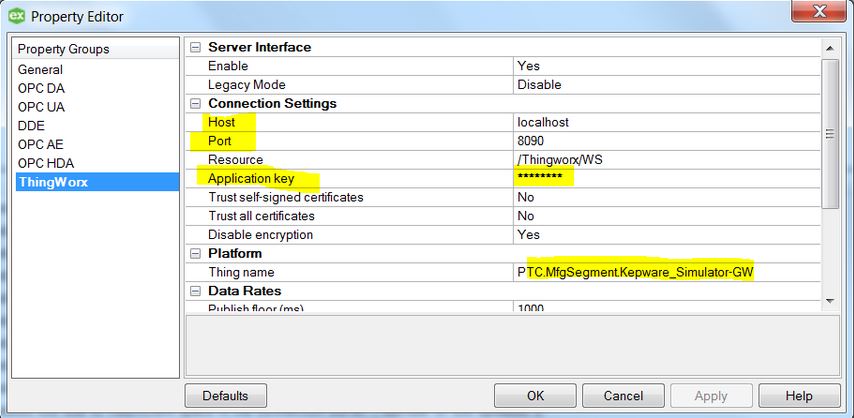
This error occurs when KEPServer is not connected to ThingWorx Platform due to any configuration issue.

Please validate the Application Key in KEPServerEX Project properties


Follow the below steps to update application key in KEPServerEX Project properties :

  1. Login to ThingWorx Composer
  2. Navigate to Application Keys
  3. Locate the Application Key matching the Thing name from KEPServerEX Project properties
  4. Copy the Application Key to KEPServerEX PropertiesCapture.JPG

Thanks,

Himanshu

1 reply

hchanana16-PearlAnswer
16-Pearl
February 5, 2018

Greetings Khelina Swate​,

This error occurs when KEPServer is not connected to ThingWorx Platform due to any configuration issue.

Please validate the Application Key in KEPServerEX Project properties


Follow the below steps to update application key in KEPServerEX Project properties :

  1. Login to ThingWorx Composer
  2. Navigate to Application Keys
  3. Locate the Application Key matching the Thing name from KEPServerEX Project properties
  4. Copy the Application Key to KEPServerEX PropertiesCapture.JPG

Thanks,

Himanshu

kswate1-VisitorAuthor
1-Visitor
February 5, 2018

Hi Himanshu

Thank you for the response, the solution you provided helped to resolve the thingworx connection error. However I still get the IOT Gateway error.

  -Information     ThingWorx Native Interface  Connected to ThingWorx. | Platform: mfgapps.prodone.com:8080/Thingworx/WS, Thing name: 'PTC.MfgSegment.Kepware_Simulator-GW'.

  - Error           IoT Gateway                 Failed to connect to server: '127.0.0.1:57212'. Please verify this connection information is correct and that the host can be reached.

Thanks once again.

Khelina

16-Pearl
February 5, 2018

Greeting Khelina Swate​,

Please make sure that 32 bit JRE is installed on the system and the IoT Gateway should be using the 32 bit JRE.

Please validate the IoT Gateway configuration in KEPServerEX settings, refer below screenshot details.

Capture.JPG

If your system is of 64 bit, install the 32 bit JRE and change the IoT Gateway settings to use 32 bit JRE.

Thanks,

Himanshu