


Exporting Data Directly From Model Manager in Creo Elements/Direct
Hi Community -
I’m trying to export a complete assembly from Creo Elements/Direct Modeling 20.3.0 w/ Model Manager Extension for another partner on my project. I’d like to make sure to include the export on the Model Manager Data as well with the exported assembly. (The Model Manager extension for Creo Elements/Direct Modeling allows a user to track all of the parts within the assembly and shows the Revision History of each part. The Model manager provides details such as part names with their version, when it was imported, and the last time it was updated….)
Questions
Do any of you know if the Model Manager specific data is saved and transferred with the export of the assembly? Do we need to do something additional to export the linked Model Manager information? Does the file type/save-as matter ( .sdexp)?
Please see example images below.
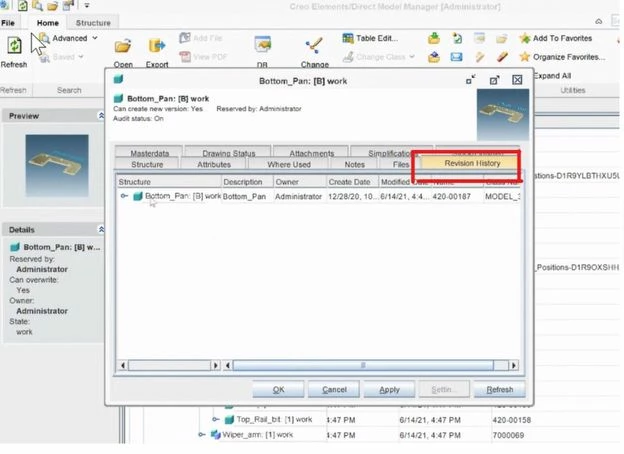
- In the Model Manager Workspace, you can see the revision history for each part in an assembly. We want this information exported out as well as the assembly.
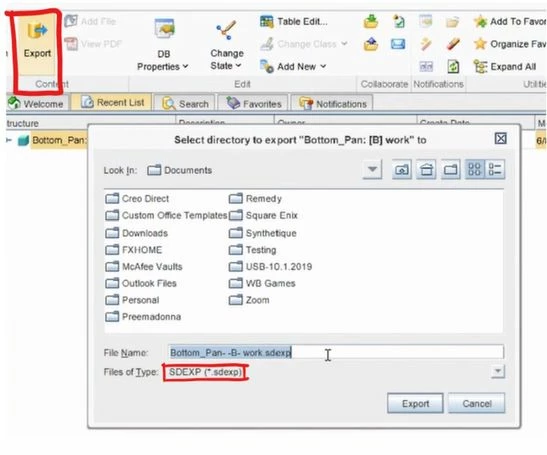
- When trying to export from Model Manager Workspace, this window pops up and asks us to export out as a .sdexp file. What information is exported out in this file type? (Full Assembly, Masterdata from Model Manager, Revision History per part?)
-
Thank You.