1-Visitor
November 21, 2023
Solved

Annotation Unit change help needed

  • November 21, 2023
  • 1 reply
  • 2040 views

I am using 20.6 Creo Elements direct,  When I am in annotation I can not change from INCH to metric as my default, I've tried changing the units, but they say they are already in MM, I also tried dimension properties but it will revert back to Inch after the selection. Any help would be greatly appreciated. 
    Best answer by ThomasKirkman

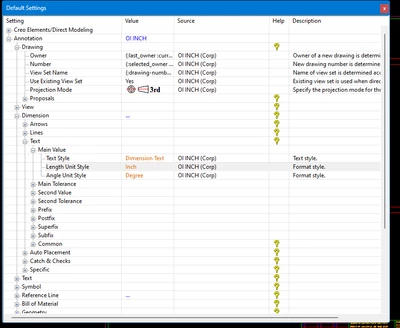
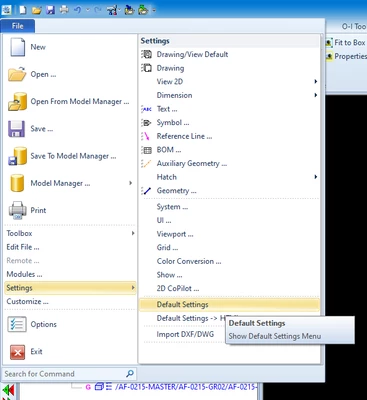
    File-> settings -> Default Settings then go to dimensions text length unit style and change it. 

    ThomasKirkman_0-1700593889472.png

    ThomasKirkman_1-1700594025495.png


    1 reply

    16-Pearl
    November 21, 2023

    Please, give screenshots of how you change the units.

    1-Visitor
    November 21, 2023

    My issue is I can't change to MM units and I need to. I did try system settings but it's already set in MM, the annotation stays in inch. I also tried dimension properties, but it will always revert back to INCH.

    GP_10708304_1-1700586669783.pngGP_10708304_2-1700586684549.png


    16-Pearl
    November 21, 2023

    File-> settings -> Default Settings then go to dimensions text length unit style and change it. 

    ThomasKirkman_0-1700593889472.png

    ThomasKirkman_1-1700594025495.png