10-Marble
March 11, 2025
Solved

Change geo resolution of an imported part

  • March 11, 2025
  • 1 reply
  • 719 views

If i create a part(.pkg) i get a geo resolution of 1.0E-6 mm.
But when i import a part to creo, for example in .step, always get a geo reolution arround 1.6E-2 mm.

The company that i work for as a module that allows me to compare the active part to the database, and returns me the part with more similarity. But this only work if a the part has a geo resolution of 1.0E-6 mm.

Is any way to work arround this? i want to use this module with imported parts, but i cant becouse i have a geo res of 1.6E-2 mm.


Creo Elements Direct 20.2.1.0
Best answer by bfivesdms
hello
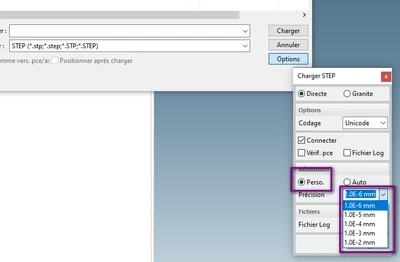
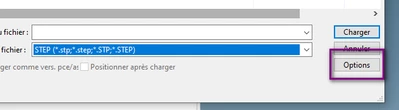
 when importing in STEP you have the possibility to choose to change the resolution of import. 
see image below.
bfivesdms_0-1741781088346.png
bfivesdms_1-1741781088347.png
The higher resolution you have, the more likely you are to have reconstruction errors .
thank you

1 reply

bfivesdms10-MarbleAnswer
10-Marble
March 12, 2025
hello
 when importing in STEP you have the possibility to choose to change the resolution of import. 
see image below.
bfivesdms_0-1741781088346.png
bfivesdms_1-1741781088347.png
The higher resolution you have, the more likely you are to have reconstruction errors .
thank you
10-Marble
March 12, 2025

Thanks!!! It worked!!