Hello everyone!
Basically, my currently job works with Creo Elements/Direct and i have acess to some addons that i dont know if everyone has acess to.
Answering to my own question, how can i do a hole table?
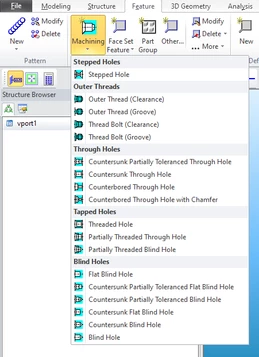
First of all, all the holes have to be done with the machining feature, to the addon that create the table be able to identified them.
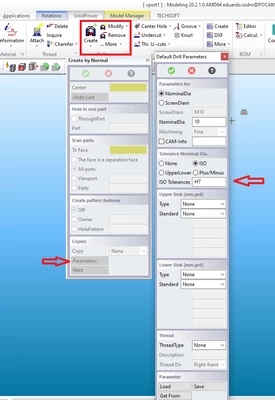
In my case i have some tolerance holes, to do that i used a addon that i have that is SolidPower that allow me to set a tolerance to a hole
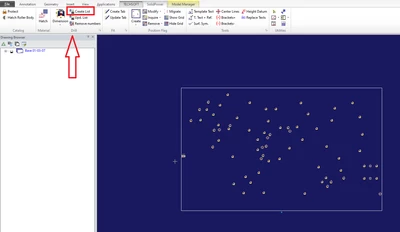
Now, we move to the 2D. Im gonna use the same base for example.
To create the hole table i use the same addon that i use to create the tolerance hole, SolidPower.
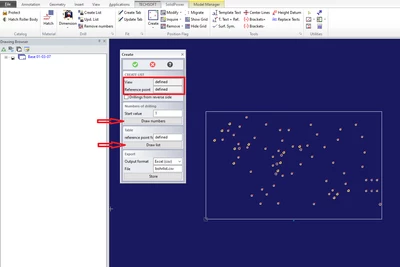
You need to:
-Choose the view
-Reference Point ( Part origin)
-Table position point
Aftter that click draw numbers to number all the holes to be identified in the table.
Final step is to draw the table.
The final result is gonna be something like that:

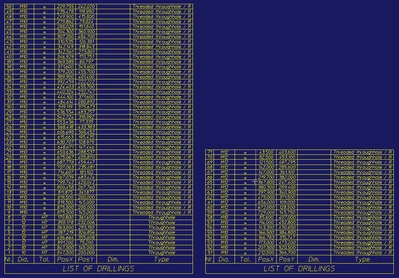
Hope this helps to anyone with this question.
The format of the table can be change (Row and columns width and height, everything....), but that im not very confortable.
Good work to everyone!


