

13-Aquamarine
April 8, 2025
Solved

Creo Elements annotation Windchill Name in drawing browser

  • April 8, 2025
  • 2 replies
  • 884 views

I went from Creo Elements 20.4 with Workgroup manager 12 to Creo Elements 20.6.2 with workgroup manager 13.0.2.1

In the drawing browser, the name of the drawing used to be the Windchill file name, and now it is the Windchill name.
Is it possible to change it to the windchill number or file name?
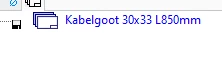
Gerard_Moba_0-1744115254543.png
I used to use it in a lisp, for example:

display (oli::sd-am-inq-drawing-no)
But now I get a different value then I used to.
Also I can't find how to get the windchill attributes (like PTC_WM_NUMBER) of the drawing in lisp.
I tried lot's of things but I can't find it.


Best answer by der_Wolfgang

Once the drawing is really loaded from Windchill, we can pick up the 'text references' as source:

;;;;;;;;;;;;;;;;;;;;;;;;;;;;;;;;;;;;;;;;;;;;;;;;;;;;;;;;;;;;;;;;;;;;;;;;;;;;;;;
;;
;; Description: get windchill drawing information using text references
;;
;; Author: der_Wolfgang@forum@cad.de
;; Created: Tue Sep 2 19:04:24 CEST 2025
;; Modified: Tue Nov 18 16:45:26 CET 2025 der_Wolfgang@forum@cad.de
;; SD-Version: developed with PE90,
;; reference: https://community.ptc.com/t5/Modeling/Creo-Elements-annotation-Windchill-Name-in-drawing-browser/m-p/1043689
;;
;; (C) Copyright 2025 der_Wolfgang@forum@cad.de, all rights reserved.
;;
;;;;;;;;;;;;;;;;;;;;;;;;;;;;;;;;;;;;;;;;;;;;;;;;;;;;;;;;;;;;;;;;;;;;;;;;;;;;;;;;;;

(in-package :am-uwgm)
(use-package :oli)

(defun am-uwgm-inq-drawing-number ()
 ; get windchill drawing number by looking into Annotation text references
 (let ((tr-values (sd-execute-annotator-function :fnc "Docu_inq_tr_types 'WTtr'")))
 (cadr (find "PTC_WM_NUMBER" tr-values :key 'car :test 'equal))
 ))

(uib::WIN-COPY-STRING-TO-CLIPBOARD (am-uwgm-inq-drawing-number))

The last line is is the part you might wanna create an available command of ..  

2 replies

13-Aquamarine
April 9, 2025

It seems that the display of the file name was a bug and the name should be shown in Creo Elements annotation:
PTC Support article CS412824

Release note Workgroup manager "DisplayNameInAnnotation"


In that case my question is more focused on the second part.
I had this code in sd_avail_cmds.cmd:

(:Application "Annotation")

(:Group "Custom" :title "Custom")

("Copy drawing number to clipboard"
 :title "Copy drawing number to clipboard"
 :action "(setf Part_number (oli::sd-am-inq-drawing-no))
(unless (equal (search \".\" Part_number) nil)
(setf Part_number_reverse (reverse Part_number))
(setf Part_number (reverse (subseq Part_number_reverse (+ (search \".\" Part_number_reverse) 1) (length (reverse Part_number)) ))))
(sd-sys-exec (format nil \"echo ~a|clip\" Part_number))"
 :description "Drawing number to clipboard"
 :image "SolidDesigner/Edit/copy" 
 :ui-behavior :DEFAULT)

It lets me copy the drawing number to the clipboard so I can paste it and search it easily in my web browser where I have multiple Windchill tabs open. Or paste it in a mail or something. (for us the drawing number is the same as the file name)
But now the name is copied to the clipboard.

I tried a few things but can't get it to work
This displays the number of the current model:

display (oli::sd-uwgm-inq-system-attribute (sd-inq-curr-part) "PTC_WM_NUMBER")

So I thought this should display the number of the current drawing:

display (oli::sd-uwgm-inq-system-attribute (sd-am-inq-curr-sheet) "PTC_WM_NUMBER")

But the sheet is not the same as the drawing.
How do I select the drawing? or at least, how do I get the PTC_WM_NUMBER of the drawing?


Catalina
Community Moderator
April 15, 2025

Hi @Gerard_Moba 

Thank you for your question. 

Your post appears well documented but has not yet received any response. I am replying to raise awareness. Hopefully, another community member will be able to help.

Also, feel free to add any additional information you think might be relevant. It sometimes helps to have screenshots to better understand what you are trying to do.


Best regards,

Catalina | PTC Community Moderator
13-Aquamarine
October 31, 2025

Also I can't find how to get the windchill attributes (like PTC_WM_NUMBER) of the drawing in lisp.
I tried lot's of things but I can't find it.

Is this part still an open sub-issue for you?

13-Aquamarine
November 17, 2025

Yes, I still want to copy the Windchill number instead of the file name.
It is not impacting our business in any meaningful way. 
But it would be nice to copy the drawing number to the clipboard.

13-Aquamarine
November 18, 2025

Once the drawing is really loaded from Windchill, we can pick up the 'text references' as source:

;;;;;;;;;;;;;;;;;;;;;;;;;;;;;;;;;;;;;;;;;;;;;;;;;;;;;;;;;;;;;;;;;;;;;;;;;;;;;;;
;;
;; Description: get windchill drawing information using text references
;;
;; Author: der_Wolfgang@forum@cad.de
;; Created: Tue Sep 2 19:04:24 CEST 2025
;; Modified: Tue Nov 18 16:45:26 CET 2025 der_Wolfgang@forum@cad.de
;; SD-Version: developed with PE90,
;; reference: https://community.ptc.com/t5/Modeling/Creo-Elements-annotation-Windchill-Name-in-drawing-browser/m-p/1043689
;;
;; (C) Copyright 2025 der_Wolfgang@forum@cad.de, all rights reserved.
;;
;;;;;;;;;;;;;;;;;;;;;;;;;;;;;;;;;;;;;;;;;;;;;;;;;;;;;;;;;;;;;;;;;;;;;;;;;;;;;;;;;;

(in-package :am-uwgm)
(use-package :oli)

(defun am-uwgm-inq-drawing-number ()
 ; get windchill drawing number by looking into Annotation text references
 (let ((tr-values (sd-execute-annotator-function :fnc "Docu_inq_tr_types 'WTtr'")))
 (cadr (find "PTC_WM_NUMBER" tr-values :key 'car :test 'equal))
 ))

(uib::WIN-COPY-STRING-TO-CLIPBOARD (am-uwgm-inq-drawing-number))

The last line is is the part you might wanna create an available command of ..