

1-Visitor
March 29, 2025
Solved

Creo Elements direct Modeling Express export DXF???

  • March 29, 2025
  • 1 reply
  • 1434 views

Hello, I am using the free Creo Elements direct Modelling express program and would like to save my 2D drawing in annotation as DXF. Unfortunately, I do not understand on your help page in which file I should change something so that I can save a dxf file. Can you offer me further assistance? Many thanks in advance and best regards Daniel
Best answer by Kotom-Eng

I forgot to tell to uncompress am_2d_0.mi as well. You will get a text file without extension am_2d_0. This is this text file that you should use with dxfdwg.


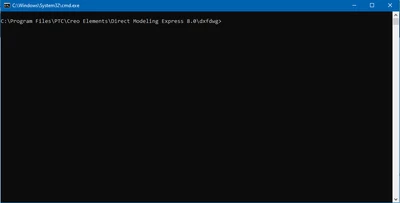
You should open a command terminal in the directory C:\Program Files\PTC\Creo Elements\Direct Modeling Express 8.0\dxfdwg\

KotomEng_0-1743427294253.png

and type in for example:

dxfdwg -o -f  C:\temp\am_2d_0 C:\temp\am_2d_0.dxf C:\temp\am_2d_0.log


1 reply

16-Pearl
March 31, 2025

Hello,

You cannot save directly to DXF from Modeling Express. But there is a workaround:

- Save in a bundle bd2.

- Unzip the bundle bd2 file. You will get a file name am_2d_0.mi

- Use the executable dxfdwg.exe located in C:\Program Files\PTC\Creo Elements\Direct Modeling Express 8.0\dxfdwg


1-Visitor
March 31, 2025

Thank you for the good news,

but I get a file that is not packed. Can you explain exactly what you mean by ‘Unzip the bundle bd2 file. You will get a file name am_2d_0.mi’.

Best regards Daniel

16-Pearl
March 31, 2025

The file bd2 is a compressed file that contains 3 files:

- am_2d_0.mi

- am_3d_0.pkg

- Thumbnail.png


The first is the 2D, the second the 3D and the third a little screenshot of the 3D.


7-zip can uncompress the file bd2.