6-Contributor
April 23, 2024
Solved

Custom ribbon named seperators?

  • April 23, 2024
  • 1 reply
  • 3895 views

Hello


I am working on a custom quick acces toolbar in Creo Elements version 20.1.2.0

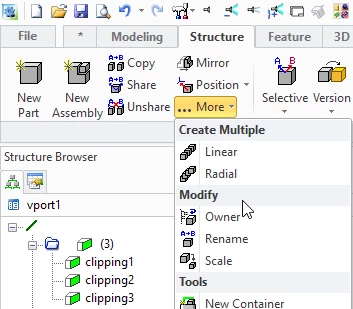
I am making 1 tab that contains all the functions i need on a regular basis. And one that relocates my most used functions to the foreground. I wanted to create named seperators like the standard menu does. But I can only find the boring old line seperator.


Is there any way to give my custom split menu a nice looking format like standard? Or is that something that is reserved for the base program?


▼What i've got so far▼
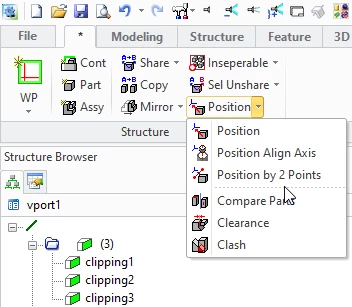
SolidDesigner_6H9kkeqa1U.png


▼What I want▼

1R3JUGZqDq.png


If anyone knows how to do this. I would love to know it. Its not completely neccesary, but it would be a nice clean look to a layout that may be used as a standard within the company.


Thanks in advance!

Best answer by AndyPoulsen

Welcome! 


I believe you should be able to get what you want by including only a ":label" component in your :contents list. For example (simplified):


:contents

'((:label "item1" :availCmd ("SolidDesigner" "MyApp" "MyFunc1")

  (:label "Separator 1")

  (:label "item2" :availCmd ("SolidDesigner" "MyApp" "MyFunc2")

)


Does that work for you? Please let me know if you have any questions.


Thanks!


1 reply

12-Amethyst
April 23, 2024

Welcome! 


I believe you should be able to get what you want by including only a ":label" component in your :contents list. For example (simplified):


:contents

'((:label "item1" :availCmd ("SolidDesigner" "MyApp" "MyFunc1")

  (:label "Separator 1")

  (:label "item2" :availCmd ("SolidDesigner" "MyApp" "MyFunc2")

)


Does that work for you? Please let me know if you have any questions.


Thanks!


IceMelon6-ContributorAuthor
6-Contributor
April 23, 2024

Hello Andy!


I'm based in the Netherlands. So it's almost bedtime for me. But I was wondering about your syntax. Because I customized my ribbon through the Creo Direct customization interface. And I have not yet tried to find the file in which this customization is stored. 


But is this just a txt or config file I can add your suggested lines to? If so, I can try that tommorow. I'll let you know if it worked.


Thanks for the reply 👍

12-Amethyst
April 23, 2024

Not sure about that -- I was thinking you were creating your own menu option using code...  I'll investigate a bit and get back to you...