
10-Marble
Nov 23, 2025 11:09 AM UTC
Question

dimensions in previous plans after installing creo elements direct modeling 9.0

Pozdravljeni!
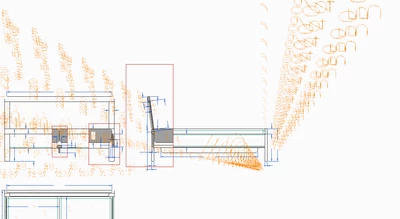
Imam težave z dimenzijami v načrtih!
Ko pregledujem načrte, ki so bili prej ustvarjeni, imam težave.
Besedilo za dimenzije izgine ali se zmeša. Kako rešiti težavo?
Hvala in lep pozdrav, Gregor
 

GregorRomanec_0-1763895852970.png


5 replies

der_Wolfgang
14-Alexandrite
Nov 24, 2025 9:26 AM UTC

you took over your customization files?  from PE80 to PE90?

it looks in the screen shot as every dimension is displayed multiple times in your view port?   

  • how does it look like when printing (e.g. to pdf) using PE90 ..   May be it is 'only'  a graphical / view port problem?   
  • how does a new drawing look like?
Translate
● cad.de + osd.cad.de ● java-forum-stuttgart.de + jugs.de ● notepad-plus-plus.org ●
10-Marble
Nov 25, 2025 6:45 AM UTC

Hello!
I downloaded the program creo elements direct modeling express 9.0 after I uninstalled the previous one.
When printing and in pdf format, the dimensions are displayed normally.
There are no such problems with new drawings.
Where and how can I download customization files from PE8.0 to PE9.0?
And this:
When starting the program, it always opens the PTC website.
Can this be turned off?
Thanks, Gregor

Translate
17-Peridot
Nov 25, 2025 8:20 AM UTC

Hi Gregor,

Let's start with that.

>When starting the program, it always opens the PTC website.  Can this be turned off?


Open in the installation directory the file   

C:\installation directory\Creo Elements\Direct Modeling Express 9.0\personality\pesd_startup


At the bottom of the file, under
;;---- Modeling Express Start Page --  
you will find
(oli::sd-display-url “http://www.ptc.com/community/creo-elements-direct/modeling-express/start.htm”)
Comment this out with   ;;
;;
(oli::sd-display-url “http://www.ptc.com/community/creo-elements-direct/modeling-express/start.htm”)


Translate