

1-Visitor
June 14, 2022
Solved

distance in direction measuring doesn't snap edges anymore (creo elements/direct modeling)

  • June 14, 2022
  • 1 reply
  • 1984 views

Hey guys!


I'm new here and have a question maybe some of you found out a solution for my problem already.

I don't know since when exactly, I don't know why at all, my measurement tool "distance in direction" doesn't snap workpiece edges anymore. Only planes now to use the planes normals for direction. Since PTC doesn't seem to have a well existing company support in germany, I thought I'd try it here hopefully someone can help me 🙂


sunny greetings from Mannheim


Fabian Klemm
Best answer by FK_10295628

Thank you very much tbraxton! 

I didn't find the menu you're showing in your screenshot but now I had a clue what to search for and I found it.

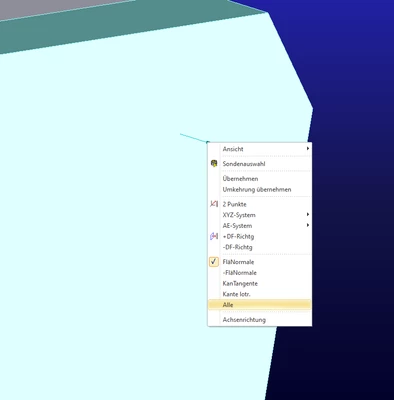
WHILST measuring, I accidentally clicked right and found this menu in my screenshot:Messmenü.png

I must anytime earlier have accidentally right clicked too and randomly clicked FläNormale, which is short for Surface Normal. After going on Alle (all) again, everything went back to normal.


Even though it wasn't 1:1 the way you gave me, you sent me in the right direction thank you so much!!


sincerely


Fabian Klemm

1 reply

1-Visitor
June 14, 2022

P.S.: catching edges doesnt work for setting the U-Direction either, when trying to adjust a working plane... so it seems to me as the program doesnt snap edges anymore at all...

tbraxton
22-Sapphire II
22-Sapphire II
June 14, 2022

Check to see what your selection filter setting is when this is happening. It is possible that the selection filter is preventing you from picking edges?


tbraxton_0-1655234078939.png


FK_102956281-VisitorAuthorAnswer
1-Visitor
June 15, 2022

Thank you very much tbraxton! 

I didn't find the menu you're showing in your screenshot but now I had a clue what to search for and I found it.

WHILST measuring, I accidentally clicked right and found this menu in my screenshot:Messmenü.png

I must anytime earlier have accidentally right clicked too and randomly clicked FläNormale, which is short for Surface Normal. After going on Alle (all) again, everything went back to normal.


Even though it wasn't 1:1 the way you gave me, you sent me in the right direction thank you so much!!


sincerely


Fabian Klemm