

7-Bedrock
January 19, 2024
Question

error when updating a view (empty part)

  • January 19, 2024
  • 4 replies
  • 2236 views

Hello,


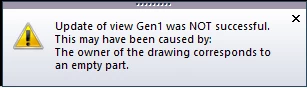
I had this error pop up for all my views when i wanted to update all the views on my drawing. First time having this error pop-up and i don't really know what it could mean. Can someone explain what it is and (if possible) tell me how to fix it without having to redo my drawing. I have a screenshot of the error itself that i will attach to this post. I am working with creo elements/direct 20.6.1.


I didn't find the location for posts about annotation so that's why i have put it here. If this isn't the right place then feel free to tell me where i need to post this.


Kind Regards,

SEEBO
 

SEEBO_0-1705653048372.png


    4 replies

    16-Pearl
    January 19, 2024

    I don't know the answer, but I can tell you that your post is in the right location. Annotation is a module of Modeling.

    16-Pearl
    January 19, 2024

    Is the drawing of an assembly? or a single part?


    Thanks


    Tom


    SEEBO7-BedrockAuthor
    7-Bedrock
    January 22, 2024

    Hello Thomas,


    The drawing is a assembly.


    Kind regards,

    SEEBO

    13-Aquamarine
    January 22, 2024

    You could save as bundle .bdl and then load everything again and try to update the views.

    Perhaps it's a data base mistake.


    You could delete some parts to find out if it works then.

    Perhaps there is an corrupt part which you can localize and repair.


    SEEBO7-BedrockAuthor
    7-Bedrock
    January 24, 2024

    Hello,


    We are working with model manager, Can i still save it to model manager when load that bundel?


    Kind Regards

    SEEBO

    16-Pearl
    January 25, 2024

    On my opinion, you can save the bundle in ModelManager after having reloaded it from the disk. Every ModelManager  metadata are saved in the bundle, such as the masterdata.

    However, if somebody has change a part existing in your assembly and saved it in ModelManager, ModelManager will ask you which part to keep (the one from the bundle or te one modified by somebody).

    16-Pearl
    January 24, 2024

    I am not sure if this will work, but it is worth a try.  right click on the problem view.  Go to calc mode and change the face parts from warning to ignore.  The same with wire parts and Workplanes.


    Tom


    ThomasKirkman_0-1706113687445.png


    SEEBO7-BedrockAuthor
    7-Bedrock
    January 25, 2024

    This did not work for me but it was indeed worth the try. i had the same error pop-up when i changed it to ignore.


    Kind regards.

    SEEBO