11-Garnet
January 22, 2025
Question

Hole axes

  • January 22, 2025
  • 3 replies
  • 2660 views

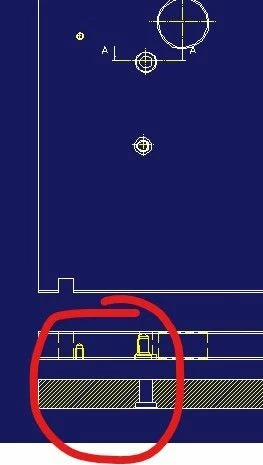
It doesn't put the hole axes in the side views or sections
Why?

Catalina_0-1737546804927.jpeg


3 replies

Catalina
Community Moderator
January 28, 2025

Hi AR

Thank you for your question. 

Your post appears well documented but has not yet received any response. I am replying to raise awareness. Hopefully, another community member will be able to help.

Also, feel free to add any additional information you think might be relevant.


Best regards,

Catalina | PTC Community Moderator
13-Aquamarine
February 20, 2025

Perhaps the part or the holes are not 100% vertical/horizontal in 3D room.

Or the section views have very small deviations in view angle.


Zoom into it and switch on the edge points (shift+F7).

Pink colored little crosses indicate if something is wrong.

AR_0111-GarnetAuthor
11-Garnet
April 30, 2025

the holes are perfectly perpendicular...isn't it some setting in the sections???

AR_0111-GarnetAuthor
11-Garnet
April 30, 2025

ould it be a resolution problem of the piece?


Screenshot 2025-04-30 170038.png

is it possible to increase the resolution?

13-Aquamarine
April 30, 2025

The default setting to create those lines is available for  "Add symmetry and centerlines to standard views during view update."  => see settings browser.

a) afterwards it can be enabled / disabled per view. (-> view properties)

b) it also depends on the view-profile which was used when creating the view  / or applied to later on.


BTW  1..2E-1 mm is a rather poor resolution for a system used to use 1E-6 mm. But it the section is defined correctly (center of hole, perpendicular) it should work as well.