6-Contributor
April 12, 2021
Solved

Set default text linespace

  • April 12, 2021
  • 2 replies
  • 1895 views

I'm trying to set a default text linespace in Annotation (19.0) but it doesn't work the way I try to configure the value. I use the following textstyle configuration. I can change Font and Color but the Linespace does not change.


(oli:sd-set-setting-values
 :application "Annotation"
 :style-path "Annotation/General/TextStyle"
 :style :STANDARD
 :title "Standard"
 :values '("Font" "arial"
		 "Color" 16776960
		 "Linespace" 1.3
		 )
)

 Should this be working this way or should linespacing be set somewhere else?
Best answer by FriedhelmK

Hi,

Is your question still up to date or have you found a solution in the meantime?

Unfortunately, I currently only had the German user interface available.

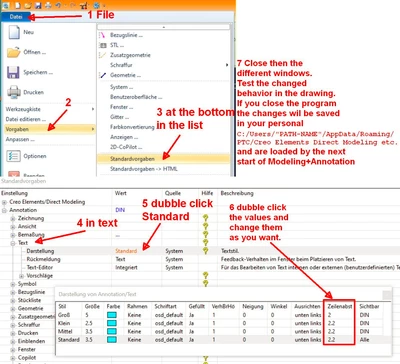
That's how I would do it.

FriedhelmK_0-1668054869342.png

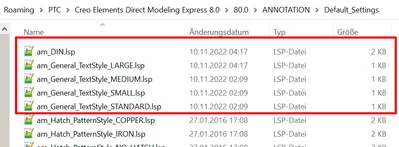
Then you should also look here before and after the adaptation.

Here the adjustments are saved if you have not changed your "User Customization Directory".

C:\Users\"Your Name"\AppData\Roaming\PTC\Creo Elements Direct Modeling "+What ever"\ANNOTATION\Default_Settings

FriedhelmK_1-1668055289218.png

I wish you a nice day

2 replies

17-Peridot
November 10, 2022

Hi,

Is your question still up to date or have you found a solution in the meantime?

Unfortunately, I currently only had the German user interface available.

That's how I would do it.

FriedhelmK_0-1668054869342.png

Then you should also look here before and after the adaptation.

Here the adjustments are saved if you have not changed your "User Customization Directory".

C:\Users\"Your Name"\AppData\Roaming\PTC\Creo Elements Direct Modeling "+What ever"\ANNOTATION\Default_Settings

FriedhelmK_1-1668055289218.png

I wish you a nice day

dgrha6-ContributorAuthor
6-Contributor
November 14, 2022

Hi, my question was already answered.  The problem was a small typo. The "S" in LineSpace should be a capital letter. I appreciate your reply though.

17-Peridot
November 10, 2022

Another remark about the order of changes.
Either
You make changes in modeling/annotation while it is running, then the changes are saved in the files when closing the program.
or
You make the changes in the files before you start the program. The files are only read at the start.

If you change the files while the program is running, nothing happens in the program.
Worse, when stopping the program, your changes in the files will be overwritten .