

Creo Illustrate 11.0 Figure Renumbering
My company creates owner’s manuals and parts manuals for our products. In our parts manuals, we organize the parts in company PN sequence by clicking Item Tag after dragging/dropping the parts list from the sBOM.
As you can see in the attached image. This is the first page of seven pages (green arrow), and I have the first item highlighted (blue arrow) to renumber. Clicking on the renumber option opens the Renumber Item popup window.
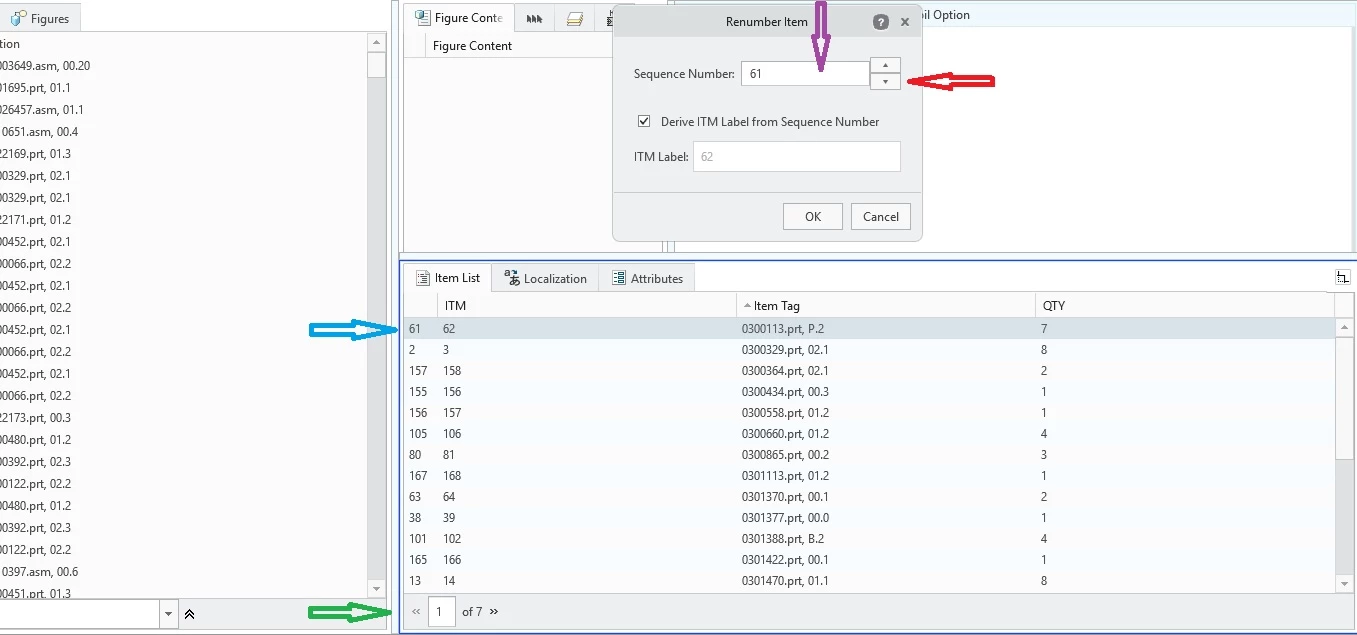
Currently, for me to change this to item number 1, I must click on the down arrow (red arrow) 61 times for this part to get it to Sequence Number 0 and ITM Label 1.
For the second part in the list, I will have to click 2 times to get it to Sequence Number 1 and ITMN Label 2.
For the third part in the list, I will have to click 155 times to get it to Sequence Number 2 and ITM Label 3.
Does anyone know of a way to renumber the list, short of my explanation above.
As you can imagine, this is EXTREMELY TIME CONSUMING. After updating only 3 parts, I have clicked 218 times. There are over 170 parts in this figure. And multiple figures in this illustration. It becomes exponential.
<<<<PTC>>>>PLEASE, PLEASE, PLEASE incorporate allowing "click and hold to repeat" (or "repeat while held") action on the up/down arrows (red arrow), OR, allow me to type the updated number directly in the Sequence Number box (purple arrow).
Thanks in advance,
John