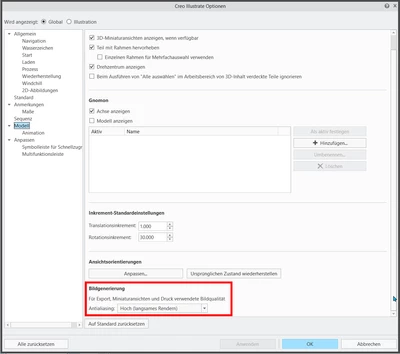

Creo Illustrate / 2D Export / Antialiasing for lines
Hello everyone,
Unfortunately I have lost my settings. So far I have been able to restore more or less all of them.
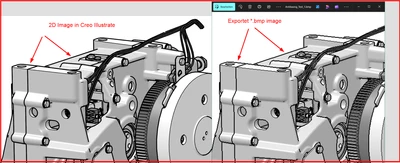
What is still missing is the antialiasing when exporting 2D views with 300dpi and *.bmp.
I have now spent 3 hours looking for the right setting....without success.
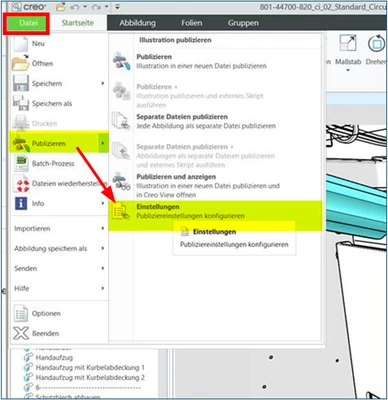
Then I saw that there are also ‘Settings’ under ‘Publish’.
Here I edited the entry ‘Creo 2D’ under ‘Publish/’2D images’ and set “Antialiasing” --> “High”.
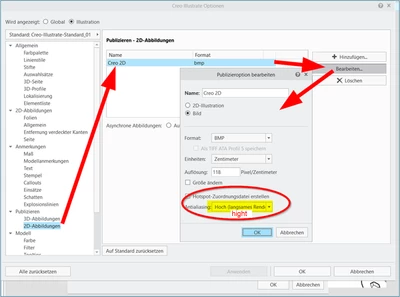
Unfortunately, this does not work.
Questions:
- How do I set antialiasing when exporting 2D illustrations?
- Why are there separate settings ‘Options’ and ‘Publish/Settings’?
- Why is the needed setting not under ‘Options/Global’, but only under ‘Options/Illustration’?
- And why in God's name does a trained engineer have to spend 3 hours searching for the right setting?
Best regards
Ramon
(Siemens-Energy)