
12-Amethyst
May 23, 2025
Solved

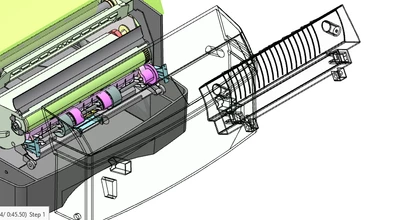
Creo illustrate-Fade out error

  • May 23, 2025
  • 1 reply
  • 742 views

Hello,


I wanted to ask regarding the fade out feature. So while animating I used the fade out feature and it worked initially, after I ran the animation again whenever I fade out my parts they go into the 'wireframe' appearance instead of disappearing. Also, I checked the transparent % and it was at 0% but it still looks like the picture I shared below.


Thank you.
RM_9880702_0-1747986055444.png


Best answer by agarland

Could you give some more details, what version of illustrate are you running, what render mode is that etc.

Obviously this shouldn't be happening, so I would suggest contacting tech support and logging a case so we can investigate the cause properly.


1 reply

agarland16-PearlAnswer
16-Pearl
May 23, 2025

Could you give some more details, what version of illustrate are you running, what render mode is that etc.

Obviously this shouldn't be happening, so I would suggest contacting tech support and logging a case so we can investigate the cause properly.


12-Amethyst
May 23, 2025

This is Creo Illustrate 11.0 render mode is white shaded illustration. I will log a case then with tech support.