

Creo Illustrate light scenes issue with object color vs. shadow appearance
Dear all,
As far as I understand the issue - it's born in the Light scenes, where shadow areas appear grey.
We facing the issue in Creo Illustrate - and looking for a light scene that I can adjust the lights are best for the used figure.
But just switching from headlight to 1,2 or 3 light - making not the big difference.
I would be more convinced if the light scene can really adjusted by placing the light.
Are there plans to improve or extenf functions along light scenes?
Or is there any workaround getting the original object color displayed, e.g. by disable lights completely?
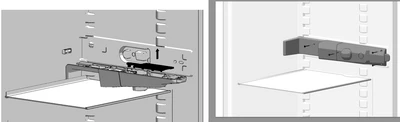
E.g. even that the left figure is not identical - the grey colored fridge frame is white, but appear due to light sceene grey. The right figure showing the expected result we want to achieve.
Regards
Robert