14-Alexandrite
January 9, 2025
Solved

Creo Illustrate / The "Line style" changes in "Insets"

  • January 9, 2025
  • 2 replies
  • 806 views

Hello all,

is it normal for the line style (e.g. centerline) to change when you place an Inset? Can this be changed or switched off?


I have placed a bolt with screw and centre line on a DIN A4 page size.

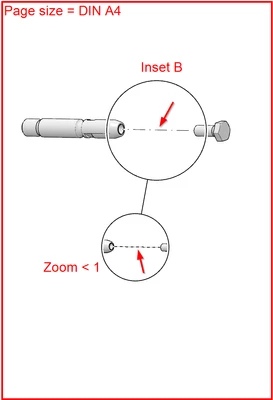
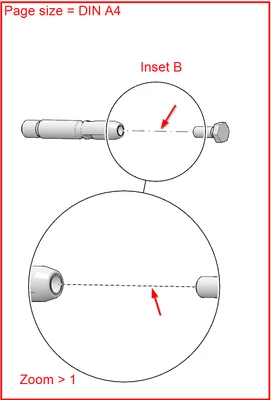
When I insert an Inset B, the centrerline style changes. In addition, the line style in the Inset (zoom) is completely different. It is far too small in this case, although it should not actually change despite positive or negative zoom. And if it does, the distances should at least become larger (and not smaller) with a positive zoom.


The line style:
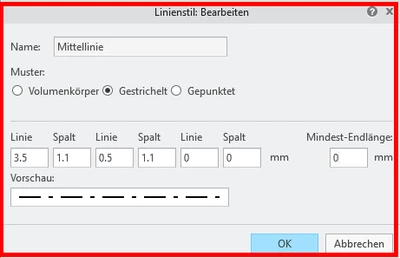
Ramon_Bohne_0-1736414900202.png


Placing a bolt and a srew on a DIN A4 page size:
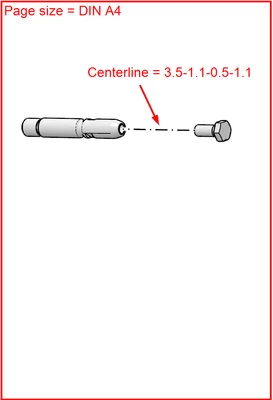
Ramon_Bohne_1-1736414951702.png


Insert a Inset B with zoom < 1:

Ramon_Bohne_2-1736415008526.png


Making the zoom >1:

Ramon_Bohne_3-1736415053131.png


Can this behavior be changed?


Best regards

Ramon

(Siemens Energy)

Best answer by agarland

This is not the expected behavior, the pattern of the dashed line should not change.

I can only suggest contacting tech support and logging a new case for this issue.


I have tried to recreate the issue but so far cannot get the centre line in the inset the change pattern like you are seeing.

2 replies

Catalina
Community Moderator
January 15, 2025

Hi @Ramon_Bohne 

Thank you for your question. 

Your post appears well documented but has not yet received any response. I am replying to raise awareness. Hopefully, another community member will be able to help.

 Also, feel free to add any additional information you think might be relevant.


Best regards,

Catalina | PTC Community Moderator
agarland16-PearlAnswer
16-Pearl
January 16, 2025

This is not the expected behavior, the pattern of the dashed line should not change.

I can only suggest contacting tech support and logging a new case for this issue.


I have tried to recreate the issue but so far cannot get the centre line in the inset the change pattern like you are seeing.

14-Alexandrite
January 16, 2025

Hello agarland,
thank you for taking the time trying to reproduce the problem.

Because you could not reproduce it, I have now tried again and what can I say, everything is fine now 🙂


I don't know what went wrong in my attempt, but here are the results of my new attempt. And as you can see, as expected, the lines don't change:

Ramon_Bohne_1-1737022556648.png

Ramon_Bohne_5-1737022649159.png

Ramon_Bohne_3-1737022597154.png

Ramon_Bohne_4-1737022611889.png


So thank you very much and the issue is closed for me.


Best regards
Ramon

(Siemens Energy)

16-Pearl
January 16, 2025

That's good news. 🙂

Although if you do come across this issue again and are able to save the file in that state, it may be worth logging a case so we can check there isn't an underlying problem.