
2-Explorer
January 11, 2019
Solved

Creo View 3.1 Default Annotation Set?

  • January 11, 2019
  • 1 reply
  • 1670 views

We are trying to start using Creo View more, but the initial view has all the components turned off and when I turn them on the model is at a weird viewing angle.  


I'd like to set this up so that the casual user gets a useful view at startup...


I can create an "Annotation Set", but how can I get that to come up as the default view?


Thanks 
Best answer by doneill

Found it! 

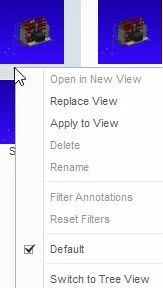
I right click on the annotation set icon and check he "Default" checkbox.1-11-2019 2-58-12 PM.jpg


To create the Annotation Set I added "Save... (Choose Save Action)" to the Quick Access toolbar.


1 reply

doneill2-ExplorerAuthorAnswer
2-Explorer
January 11, 2019

Found it! 

I right click on the annotation set icon and check he "Default" checkbox.1-11-2019 2-58-12 PM.jpg


To create the Annotation Set I added "Save... (Choose Save Action)" to the Quick Access toolbar.