
4-Participant
July 16, 2024
Solved

Creo View BOM Interactivity (Creo View Express 11)

  • July 16, 2024
  • 1 reply
  • 1141 views

I was wondering whether it is possible to have an interactive BOM table in creo view. The idea would be that if a user selected a part in creo view, it would highlight in the corresponding row of the BOM table (and, if possible, vice versa). Any sort of similar feature or function would also do.
Best answer by llie

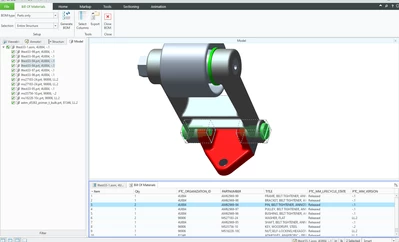
This is Creo View out of Windchill. I selected the part from the BOM table on the bottom data panel and it boxes the part in the UI as well as highlights the parts in the model tree.


llie_0-1721248740824.png


1 reply

llie17-PeridotAnswer
17-Peridot
July 17, 2024

This is Creo View out of Windchill. I selected the part from the BOM table on the bottom data panel and it boxes the part in the UI as well as highlights the parts in the model tree.


llie_0-1721248740824.png


JosephTC4-ParticipantAuthor
4-Participant
July 18, 2024

That's great thank you, do you know if the Creo View BOM item list order matches the item/part order list from BOM tables in Creo Parametric or other creo modelling software?