16-Pearl
June 1, 2016
Solved

Creo View User Preference - Setting up Path for Cache Folder Location

  • June 1, 2016
  • 2 replies
  • 10762 views

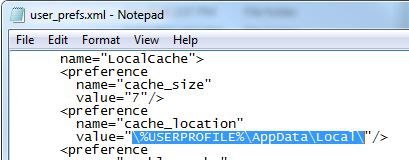
Ok...so I'm tyring to modify the XML file for user preferences so I can distribute to other user's and have their cache set up and enabled.  What is the line of text I need for the value of cache_location?  I've tried about 10 different variants without any luck.  
location-cache-folder-user-prefs.JPG

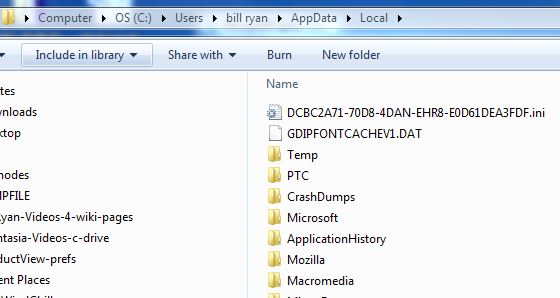
I'm trying to go here...

location-cache-folder-user-prefs-a.JPG

Best answer by BillRyan

Thanks Martin and my friends at Leyland for helping out...the work around I found was to leave the value for cache location unset as shown below.  With Cache enabled, the file path gets generated on Launch of Creo View and saved into the XML file upon exit.   More testing would need to be done for this be set on the server_prefs.xml or admin_prefs.xml per CS32479, but for me to hand it off as a user_prefs.xml file this will be sufficient.

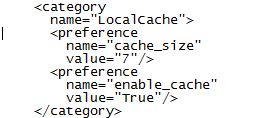
Initial Settings as shown below in user_pref.xml file

location-cache-folder-user-prefs-b.JPG

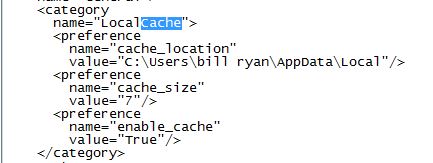
After user launches and exits, the XML file gets updated as shown below.

location-cache-folder-user-prefs-c.JPG

2 replies

24-Ruby III
June 2, 2016

Hi,

some notes ...

1.]

\%USERPROFILE%\AppData\Local\ ... you have to remove first backslash, its presence doesn't make any sense

2.]

I didn't find any information describing format of user_prefs.xml file. Therefore I don't know, whether variables are allowed inside it. You can ask PTC Support.

3.]

In config.pro, variable notation (Unix like) is ... $USERPROFILE ... you can try this notation in user_prefs.xml file

4.]

If user_prefs.xml file distribution is performed when user launches Creo View, then you can include a script into Creo View startup sequence and replace variable in user_prefs.xml file by its real value.

MH

BillRyan16-PearlAuthorAnswer
16-Pearl
June 2, 2016

Thanks Martin and my friends at Leyland for helping out...the work around I found was to leave the value for cache location unset as shown below.  With Cache enabled, the file path gets generated on Launch of Creo View and saved into the XML file upon exit.   More testing would need to be done for this be set on the server_prefs.xml or admin_prefs.xml per CS32479, but for me to hand it off as a user_prefs.xml file this will be sufficient.

Initial Settings as shown below in user_pref.xml file

location-cache-folder-user-prefs-b.JPG

After user launches and exits, the XML file gets updated as shown below.

location-cache-folder-user-prefs-c.JPG

BillRyan16-PearlAuthor
16-Pearl
December 21, 2017

Here is the server side context level preference setting in the XML file for reference that we use.  I chose to lock it to ensure it gets pushed out for our development contexts. 


<!--Comment - Setting enables cache on the client machine to store locally the Creo View graphics files stored in Windchill-->
<!--Comment - Note: This Setting provides significant performance benefits for users when they load the same content.  May need to consider a future process to clean the client cache-->
    <category
      name="LocalCache">
      <preference
        name="enable_cache"
        value="True" locked="true"/>
    </category>

14-Alexandrite
November 2, 2018

I just posted an enhancement request, to support the cache_location in the server_prefs.xml.

Please support Idea: 579454