8-Gravel
January 7, 2013
Question

Customising Callouts in Creo Illustrate (2.0 M020)

  • January 7, 2013
  • 2 replies
  • 4777 views

I want to create a callout in Creo Illustrate that shows the Description of the object as the text in the callout.

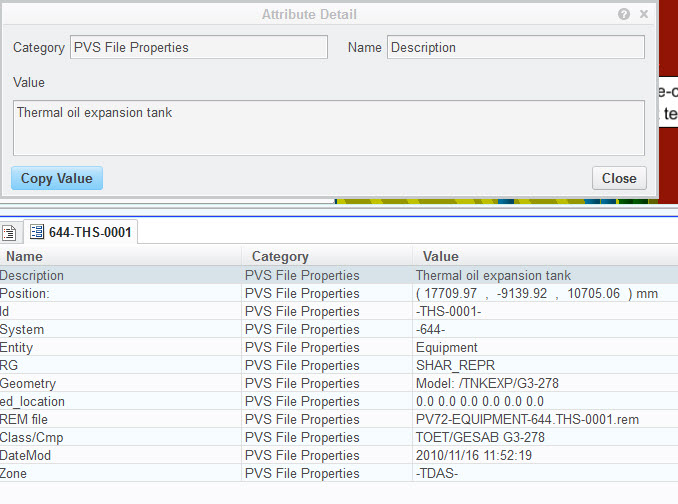
I can see the description property in the pvs file in Creo Illustrate but I cannot get it to populate the callout.

I have added the following snippet to the CalloutTemplates.xml file :

<annotation id="ship-description" hasLeaders="true">
<name locid="DEFItemNumber-SHIP"/>
<description locid="DEFItemNumberDescription"/>
<tooltip locid="DEFItemNumberTooltip"/>
<thumbnail url="ship_note.png"/>
<leaders>
<line-style weight="1pt" color="#000000" halo="false" dashes="Solid" start="none" end="none"/>
</leaders>
<label canEdit="true">
<text font="Arial" size="10pt" color="#000000">
<useproperty category="PVS File Properties" name="Description"/>
</text>
<shape type="rectangle"/>
</label>
</annotation>

07-01-2013+16-52-36.jpg

Did I reference the property value correctly.

I have another (Creo Parametric based) example that has description in the category PROE Parameters and that one works fine.

I also looked at the Creo Illustrate help. But cannot find any reference to customising callouts or any limitations.

Any help or advise is much appreciated.

Thanks,

Theo

2 replies

1-Visitor
January 7, 2013

Hi Theodorus,

The latest Creo Illustrate install guide (https://www.ptc.com/view?im_dbkey=148898) has two new appendices on customizing annotation styles by editing the callout templates XML file.
Unfortunately, the <useproperty> examples on pp. 91-92 only cover category="PROE Parameters" and category="System".

It *should* work for category="PVS File Properties" as well...but I'll have to look into this.
Meanwhile, you might try substituting category="PROPERTIES" (all caps) for category="PVS File Properties" and see if that works (This is just a hunch.)

Regards,

Mark

12-Amethyst
January 7, 2013

Theo

Congratulations. You've found a little bug

I just tried this myself, and found it will *not* work for PVS File Properties.

It *will* work for other property groups e.g. PROE Parameters, WindchillEPM, WindchillPart etc.

The bug is basically in handling "PVS File Properties", which is a 'magic' attribute group. It is so magic that it doesn't actually have a name - the group category title is, in fact, "" (empty string) and the callout template code is not dealing with this correctly.

Can you submit an SPR please?

thanks

-steve

8-Gravel
January 8, 2013

Thanks Steve,

I will log a case with Tech Support and ask them to raise an SPR.

In the mean. I am trying to show something during a demo. I have proe dataset that I can use to show an example but the data is not that relevant to the customer.

Is there a way to show the Item Tag in the call out (as created in the items list).

The call out template has an example for item number and quantity :

<useproperty category="System" name="pvITM"/> x<useproperty category="System" name="pvQTY"/>

It uses the category System. What other properties are part of the category 'system'. I have tried pvItemTag and various variations of that but that doesn't seem to work.

An other options could be component name.

Any ideas ?

Thanks,

Theo

12-Amethyst
January 8, 2013

Hi Theo

you can currently use pvITM, pvQTY

Support for pvTAG has been added to x24 (Creo Illustrate 3.0)

tag =<useproperty category="System" name="pvTAG"/>

-steve