10-Marble
May 13, 2024
Question

Edit View Orientations: Can't rotate orientation about X-axis!

  • May 13, 2024
  • 1 reply
  • 926 views

I'm trying to create a custom view orientation. No matter what I do, I can only rotate the view orientation about the Z- and Y-axis, but not about the X-axis.


When I change the numerical value either in the X- or in the Z-angle input box, the view orientation always rotates about the Z-axis and never about the X-axis.


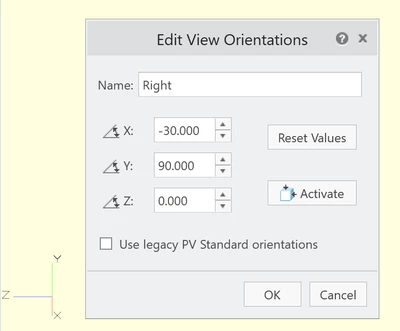
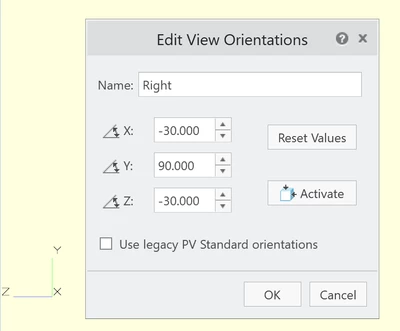
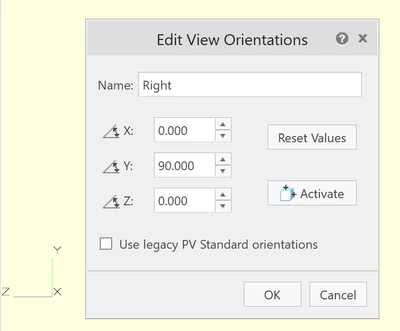
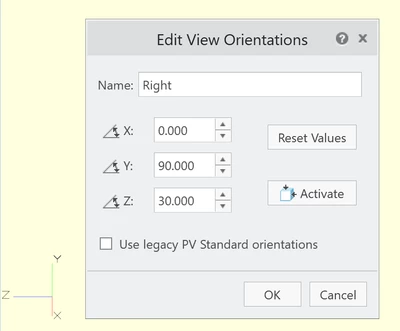
The attached screenshots show different angle values entered in the X- and/or Z-angle input box. It can be seen that the angle always changes about the Z-axis and never about the X-axis.
 

Edit View Orientations 2.png

1. Start: X-angle and Z-angle are zero
 

Edit View Orientations 4.png

2. Changed the Z-angle -> view rotates about Z-axis


Edit View Orientations 3.png

3. Changed the X-angle -> view rotates about Z-axis


Edit View Orientations 1.png

4. Changed both Z-angle and X-angle -> view does not rotate at all, Z and X cancel each other out  

1 reply

16-Pearl
May 13, 2024

If using something besides 90 value, do you see what you expect?  I think I'm repeating your issue with the 90 on Y and this would require a ticket with Tech Support to resolve.    Our controlled defined Views in our environment only require rotation about two axis.  My views with all three axis changes are working fine.  


orientation.png

VecTor10-MarbleAuthor
10-Marble
May 13, 2024

Thanks, I'm seeing the same orientation as in your example.


However, this orientation is also wrong, because no matter what you now enter into the X angle box, the view is actually rotated about where the Z axis was originally (i.e. about an axis parallel to the bottom border line of the below dialog box) and still not about the X axis!


VecTor_0-1715623117881.png