1-Visitor
April 3, 2018
Solved

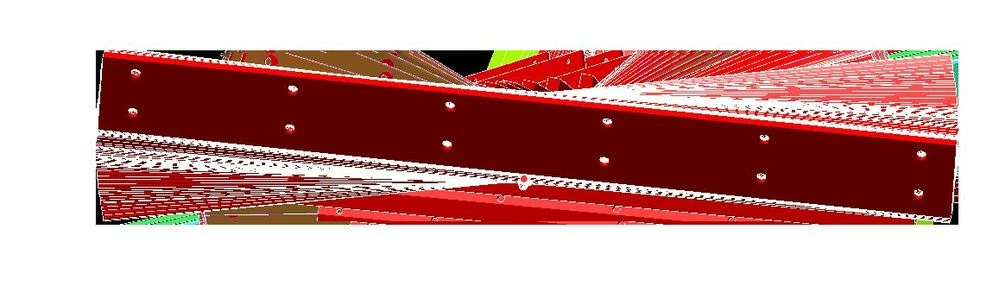
graphical distortion when opening any and all models

  • April 3, 2018
  • 2 replies
  • 10296 views

Every model I open has this same distortion. I have uninstalled and reinstalled and still have this issue. This issue occurs on even the smallest file sized models.  Any help would be greatly appreciated! 

when i first open the model everything is fine until i drag the mouse courser over the model.

I am using creo view lite 4.1argh.JPGwwhyyyyyy.JPG
Best answer by Bkitty-APTC

using the environment variable- PV_ENABLE_FRAMEBUFFER_OBJECT=1 did not seem to help the tracing and distortion.

i have solved the issue by disabling openGL. 

i did this through system environment variables.

the graphic quality is slightly degraded but barley noticeable 

i no longer have the tracing and distortion. 


  •   PV_DISABLE_PBUFFER=true
  •   PV_DISABLE_MULTISAMPLE=true
  •   PV_DISABLE_SHADOW=true
  •   PV_DISABLE_MULTI_DRAW_ARRAYS=true
  •   PV_DISABLE_FRAMEBUFFER_OBJECT=true
  •   PV_DISABLE_VERTEX_BUFFER_OBJECT=true

2 replies

21-Topaz II
April 3, 2018

That looks like a graphics driver issue, but I'm not sure what the graphics requirements are for Creo View Lite.  I couldn't find much info on it by searching PTC.com.  I would assume it would be fairly low as it's meant for non-CAD users.


This page only says that it needs Windows XP, Vista or Windows 7.  Maybe it's been discontinued and not usable on Windows 10?

1-Visitor
April 3, 2018

thanks, 

I have updated all graphics related drivers and non related drivers.  this issue came with no warning after months of using creo view with no issues.  

 my laptop is dell e7470 i am using windows 10


21-Topaz II
April 3, 2018

If you have maintenance, I'd open a call with PTC support.

17-Peridot
April 3, 2018

Dell graphics drivers are sacred!  I have run a PTC qualified Dell laptop with NVidia for a long time and I can tell you one thing... never use NVidia drivers from NVidia.  The only drivers that worked with Creo and Dell was Dell scripted drivers.

Whenever I wanted to try a NVidia driver from NVidia, the driver would also leave "tracers".


Most likely, windows 10 automatically installed drivers from NVidia since it considered them available.  Even Windows 7 is nagging me to update.


1-Visitor
April 3, 2018

thanks ,


all the drivers i have used come directly from dell. also my computer is not equipped with nvidia graphics. it has intel HD graphics 520


17-Peridot
April 3, 2018

That helps 🙂  I will still point to a driver update since it use to work correctly.


You can try to create a support case as previously suggested.

Is this a qualified laptop?


You might also have some luck changing to the win32_gdi setting in config.pro.

Not an elegant solution but it may get you down the road a bit until this is figured out.


Arg...  Creo VIEW!  🙂


display_options.png