
13-Aquamarine
August 9, 2023
Solved

How to change the sequence or step speed(fps) in Creo Illustrate for publishing in Vuforia Studio?

  • August 9, 2023
  • 1 reply
  • 2865 views

Dear PTC community,

Please, advise how I can change the fps speed for the already-done sequence. My current sequence is too slow and I want it to play 2xfaster.

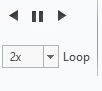
I see that there is an option to play it faster within the Creo Illustrate:
IB_10645210_0-1691599436675.png

I know that I can manually shrink the length of each step or if necessary shrink each effect duration: it takes too long for 10 sequences.(20 steps each).

But I don't know how to set 2x speed for fps for publishing pvz and  c3di  Vuforia Studio. Please advise any solution,


Best answer by agarland

The option you have shown is simply a playback speed and does not affect the published output.

The only way to slow down the playback in the published files is to stretch the step in the timeline as you have mentioned.


1 reply

agarland16-PearlAnswer
16-Pearl
August 10, 2023

The option you have shown is simply a playback speed and does not affect the published output.

The only way to slow down the playback in the published files is to stretch the step in the timeline as you have mentioned.


13-Aquamarine
August 10, 2023

@agarland  thank you for your response.

but 😢 still have hope ...

Probably there is some Java script way in Vuforia Studio to play steps faster/slower.


12-Amethyst
August 10, 2023

Nope.

Like Adrian said, if you want the sequence to go faster, you modify the sequence (in Illustrate) to make it run faster.