
6-Contributor
December 21, 2023
Solved

Shortcuts for orientations in CreoView

  • December 21, 2023
  • 1 reply
  • 2639 views

Hello All.
I recently started working on CreoView and after having moved from Solidworks, I am unable to use shortcuts for viewing objects quickly such as (ctrl+1,2,3...) for viewing the model in different orientations. Can  anyone please tell me how to use these shortcuts to improve the productivity
Best answer by agarland

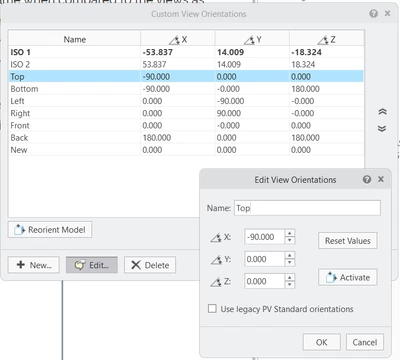
You can customize the existing orientations:

Customize orientations.png

1 reply

16-Pearl
December 21, 2023

Here is a link to the keyboard shortcuts documentation:

Keyboard Shortcuts for MCAD

This should help.

6-Contributor
December 21, 2023

Thank you very much for the reply @agarland 
But I am not able to access the link that you have pasted. Can you send it again. 


16-Pearl
December 21, 2023

Apologies, pasted the wrong link!

This one should work:
Keyboard Shortcuts for MCAD (ptc.com)