
2-Explorer
January 11, 2019
Solved

Creo View 3.1 Default Annotation Set?

We are trying to start using Creo View more, but the initial view has all the components turned off and when I turn them on the model is at a weird viewing angle.  


I'd like to set this up so that the casual user gets a useful view at startup...


I can create an "Annotation Set", but how can I get that to come up as the default view?


Thanks 
doneillAnswer
2-Explorer
January 11, 2019

Found it! 

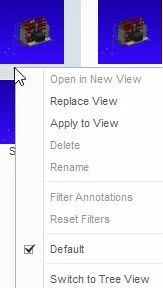
I right click on the annotation set icon and check he "Default" checkbox.1-11-2019 2-58-12 PM.jpg


To create the Annotation Set I added "Save... (Choose Save Action)" to the Quick Access toolbar.


1 reply

doneill2-ExplorerAuthorAnswer
2-Explorer
January 11, 2019

Found it! 

I right click on the annotation set icon and check he "Default" checkbox.1-11-2019 2-58-12 PM.jpg


To create the Annotation Set I added "Save... (Choose Save Action)" to the Quick Access toolbar.


Translate