6-Contributor
December 21, 2023
Solved

Shortcuts for orientations in CreoView

Hello All.
I recently started working on CreoView and after having moved from Solidworks, I am unable to use shortcuts for viewing objects quickly such as (ctrl+1,2,3...) for viewing the model in different orientations. Can  anyone please tell me how to use these shortcuts to improve the productivity

agarland
agarlandAnswer
16-Pearl
December 21, 2023

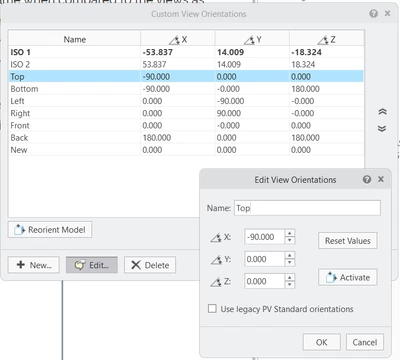
You can customize the existing orientations:

Customize orientations.png

6 replies

agarland
16-Pearl
December 21, 2023

Here is a link to the keyboard shortcuts documentation:

Keyboard Shortcuts for MCAD

This should help.

Translate
6-Contributor
December 21, 2023

Thank you very much for the reply @agarland 
But I am not able to access the link that you have pasted. Can you send it again. 


Translate
agarland
16-Pearl
December 21, 2023

Apologies, pasted the wrong link!

This one should work:
Keyboard Shortcuts for MCAD (ptc.com)

Translate