Dale_Rosema
23-Emerald III
23-Emerald III
October 12, 2023
Solved

Highlighted error off the screen - could not find it till the next day.

  • October 12, 2023
  • 2 replies
  • 1338 views

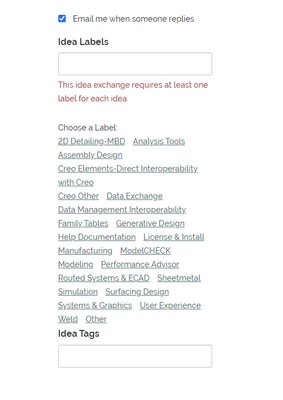
Recently posting an idea to the PTC Creo Ideas page and was getting an error stating to check the highlighted portion and fix..


What I didn't realized is that I had to scroll down quite a bit to find the errors on the bottom right of the

page below the screen window that I was filling out for the idea.


Not very intuitive that the "error" is off the screen and I have to scroll down to find it. It would be better if this error was visible or if you click on the error, it show you the "highlighted" error.

Thanks,

Dale


Dale_Rosema_0-1697118520217.png


Best answer by AndrewK

@Dale_Rosema 


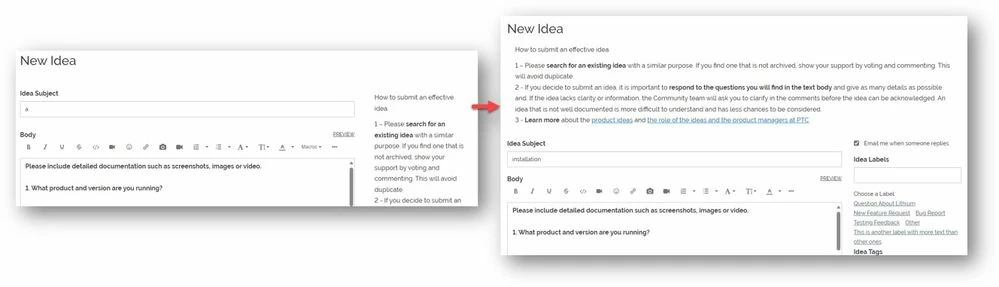
We published an update today moving the advisory message on the idea post page to the top of the page. Now the required labels section of the form will be clearly visible.

AndrewK_0-1701179928434.jpeg


2 replies

Community Manager
October 12, 2023

I agree. On regular forums the label text box is near the top of the page and easy to see, but on the idea boards it is pushed down the page by the advisory message we are showing. We should probably relocate that message. I will talk it over with the team.

AndrewKCommunity ManagerAnswer
Community Manager
November 28, 2023

@Dale_Rosema 


We published an update today moving the advisory message on the idea post page to the top of the page. Now the required labels section of the form will be clearly visible.

AndrewK_0-1701179928434.jpeg