Dale_Rosema
23-Emerald III
23-Emerald III
May 30, 2024
Solved

How To's

  • May 30, 2024
  • 1 reply
  • 1185 views

Just perused the "How To's" to find out how to attached a file to your post. I know I've seen it in CAD area, but I thought I'd find it in the "How To's".

Did I miss it?

Best answer by AndrewK

Hi Dale,


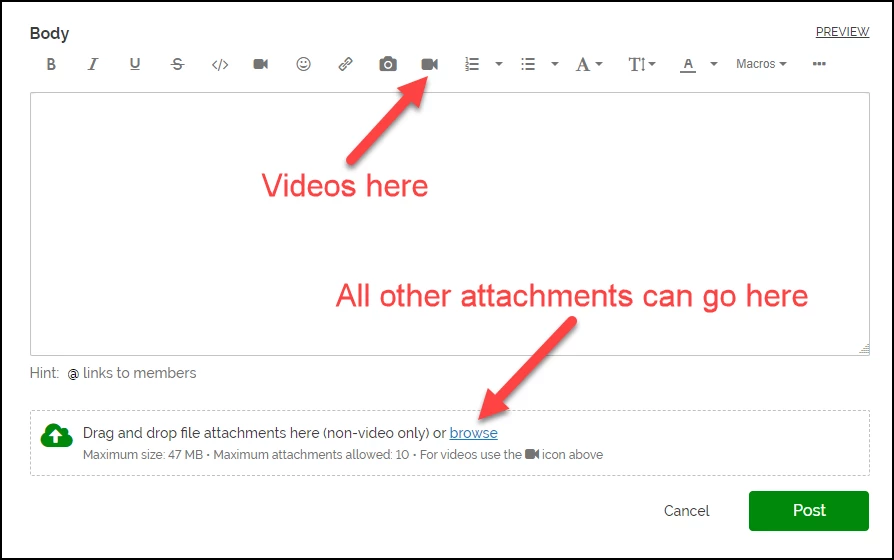
I had a look and found this post in How To's, but it could probably use an update with a little more information, like allowed file types etc., but you can drag and drop files or browse with the interface under the editor. We allow most file types, but if you are having trouble uploading a file try a zip file. The one exception is for videos which have a separate button to upload.


AndrewK_0-1717069031029.png


1 reply

AndrewKCommunity ManagerAnswer
Community Manager
May 30, 2024

Hi Dale,


I had a look and found this post in How To's, but it could probably use an update with a little more information, like allowed file types etc., but you can drag and drop files or browse with the interface under the editor. We allow most file types, but if you are having trouble uploading a file try a zip file. The one exception is for videos which have a separate button to upload.


AndrewK_0-1717069031029.png


Dale_Rosema
23-Emerald III
23-Emerald III
May 30, 2024

I searched for "attach file" & "attach part" and missed it when I scrolled past "Drag and Drop" in the "How To's".

I looked at several pages to see if I could find it...   ðŸ™‚