Dale_Rosema
23-Emerald III
23-Emerald III
July 25, 2023
Solved

Messaging someone who posted on the forum.

  • July 25, 2023
  • 2 replies
  • 1948 views

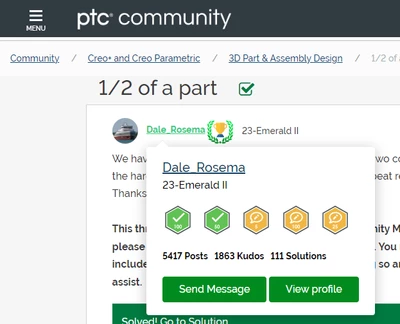
After hoovering over a community members id, a pop-up shows up with (2) options: Send message or View profile. (I'll use one of my older post as an example.)
 

Dale_Rosema_0-1690300914272.png


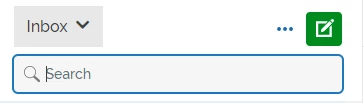
If you click on Send Message, you are brought to the messaging part of the app, but it hasn't started a new message, also you still have to search and find the member id you just clicked on in order to send a message.
 

Dale_Rosema_1-1690301047271.png


I would think that a new message would be started and addressed to the appropriate ID.

Best answer by AndrewK

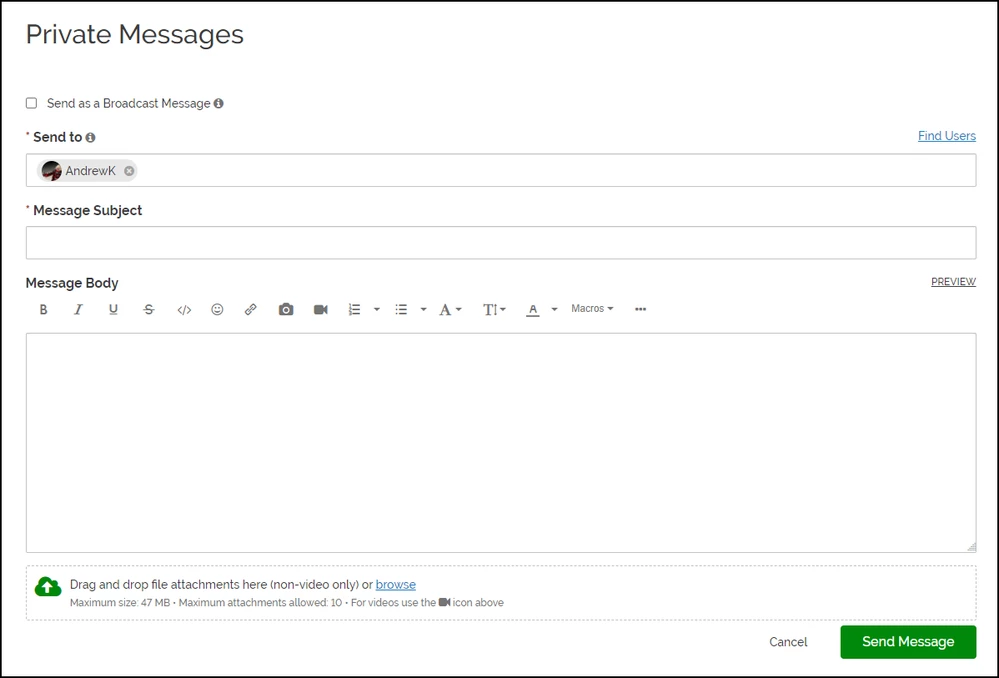
Hi @Dale_Rosema this turned out to be a fairly easy fix, so next Tuesday we will be publishing a change to the hover card "Send Message" link. It will now take you to a private message page with the name of the recipient already set like this.


AndrewK_0-1691694219897.png


2 replies

olivierlp
Community Manager
July 25, 2023

Hi @Dale_Rosema 

This is one of the annoying things about the site. To do what you are describing, and picking up where you left it, you need to click on the New Message icon, already activated in green. Not intuitive. 


olivierlp_1-1690303070934.png


Then you land directly on the next logical step. 

We will see if and how we can remove the unnecessary step above to land directly on what you see below. 


olivierlp_0-1690302969998.png


Olivier
Dale_Rosema
23-Emerald III
23-Emerald III
July 25, 2023

Yes it works....


... intuitive is way beyond asking. Especially since the last message received is still highlighted....

23-Emerald IV
July 25, 2023

I have replied to the wrong person multiple times due to this very issue.

AndrewKCommunity ManagerAnswer
Community Manager
August 10, 2023

Hi @Dale_Rosema this turned out to be a fairly easy fix, so next Tuesday we will be publishing a change to the hover card "Send Message" link. It will now take you to a private message page with the name of the recipient already set like this.


AndrewK_0-1691694219897.png