16-Pearl
April 18, 2026
Solved

Topics marked as read

  • April 18, 2026
  • 5 replies
  • 93 views

Hi,

Previously, in  Khoros Platform topics that had already been read were marked as read, is some similar action planned in Gainsight Platform?

I am not sure, could be, unread messages were in bold and read ones were not...
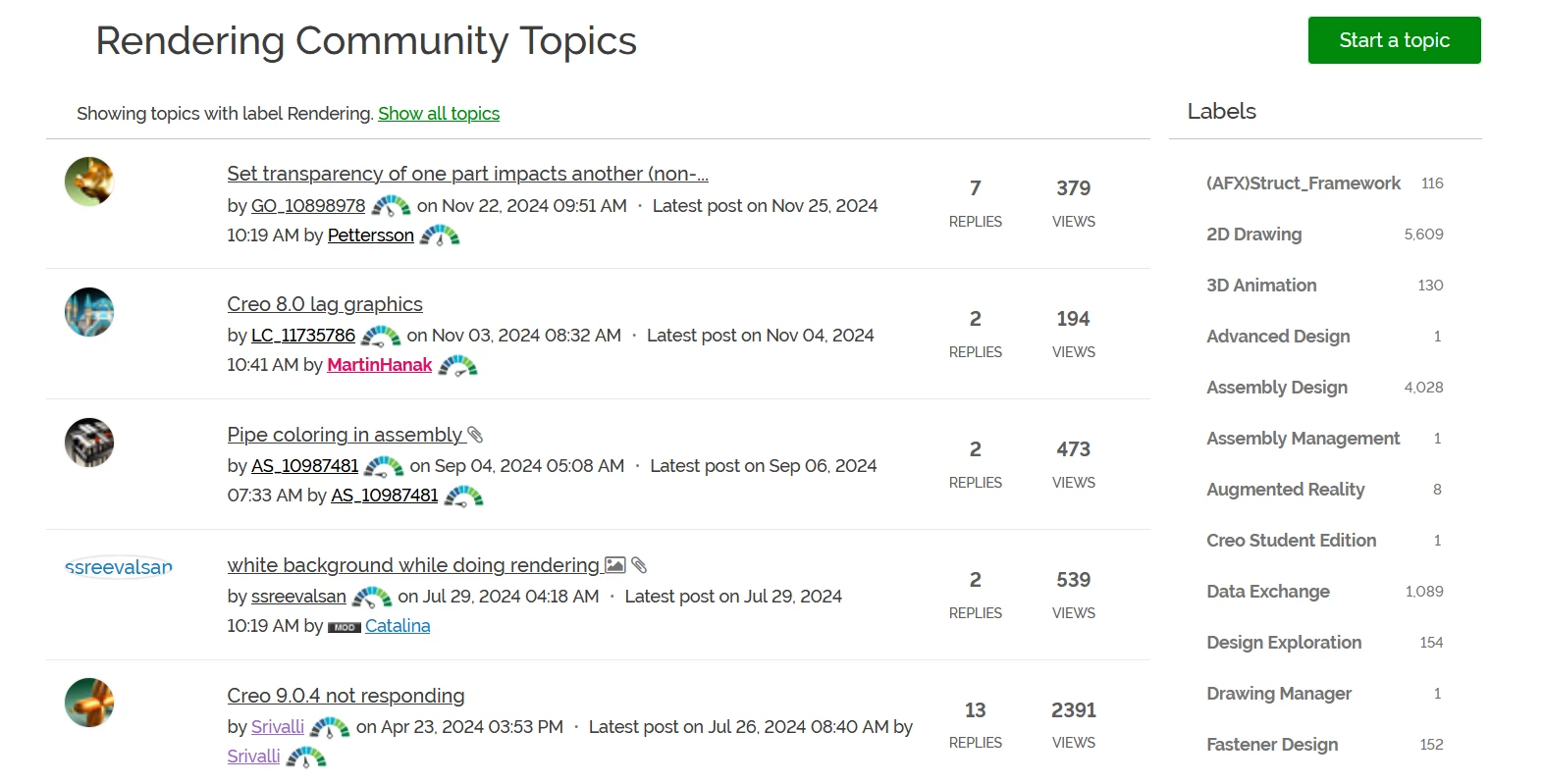
Thank you

Best answer by der_Wolfgang

I tweaked my browser’s CSS behavior a little: 

span.topic-list-item-card_title-text.topic-list-item-card_title-text--read::before {
content: "Read ";
color: lightgreen;
}

Well a  CSS-class topic-list-item-card_title-text--new would be more helpful.  ( to add a ‘new’ badget)

5 replies

25-Diamond I
April 18, 2026

I second that wish/suggestion!

There was also the option to display a list jut of the unread topics which was quite valuable.

AndrewK
Community Manager
April 20, 2026

Thanks for the feedback! A couple of things to note.


First, in your General Settings https://community.ptc.com/settings/general make sure “Display numbers of new community activities” is turned on. This will allow you to see new replies on a topic.


Second, you can tell if a topic is unread by the color of the title, but it is a very subtle difference. We are planning to change that to make it more pronounced.


Unfortunately, there currently isn’t a way to filter only unread topics, but it is something we can look into providing. In the meantime, there are some options at the top of the community menu that might be helpful although they are community wide.


25-Diamond I
April 20, 2026

Thanks for pointing us at this option. Its quite tricky that we have to chose for a number(?) to be displayed to get threads with unread messages highlighted ;-)
But I can confirm that its works.

Too bad we cannot filter for all unread threads in a specific subforum as community wide information is not helpful.

This is also true for the “New Solutions” in the right-hand column. It should only apply to the current subforum.

I also wonder who would honestly be interested in the “Badge Winners” information - but then, I never understood what these badges should be good for anyway.


A bit off-topic but of highest priority to me: Is it intended to work on the general layout of the thread overview pages?

I think the current layout is awful and extremely confusing/distracting.
It should clearly show, at a glance and without any frills, the most recent threads where there has been activity. In other words, as many as possible on a single page without having to scroll a lot.
The current layout, with its huge rectangles and wide spacing between them, is exactly the opposite.
A simple list with two lines per thread and a small (!) space between them should provide much better clarity and significantly greater user-friendliness. I’d just as happily do without the first two lines being quoted as I would the number of likes and views. The number of replies shouldn’t just refer to the direct responses to the initial post, but should indicate the total number of replies.
Personally, I would prefer a specific date and time (based on the system time) instead of “2 months ago.”

der_Wolfgang
14-Alexandrite
April 20, 2026

I totally agree with you Werner, regarding the clarity, white space etc..  

IMHO Web Designers more and more focus in their design on smartphones and tables.

The (bad) result is for example that your text above is displayed in a 755px wide box  encapsulated in a div tag limited to 'max-width: 1140px;'  and over all on my screen which provides 2560px in width.  It's a waste of screen area by those kind of concepts and is causing scrolling and scrolling. 

Good (website) Layouts for desktop displays ( which get bigger and bigger nowadays) become more and more rare! :-(

The information pane is often turning into an information pain.

● cad.de + osd.cad.de ● java-forum-stuttgart.de + jugs.de ● notepad-plus-plus.org ●
der_Wolfgang
14-Alexandrite
April 20, 2026

I tweaked my browser’s CSS behavior a little: 

span.topic-list-item-card_title-text.topic-list-item-card_title-text--read::before {
content: "Read ";
color: lightgreen;
}

Well a  CSS-class topic-list-item-card_title-text--new would be more helpful.  ( to add a ‘new’ badget)

● cad.de + osd.cad.de ● java-forum-stuttgart.de + jugs.de ● notepad-plus-plus.org ●
AndrewK
Community Manager
April 20, 2026

Excellent! ​@der_Wolfgang  Looks good.

der_Wolfgang
14-Alexandrite
April 20, 2026

Half an hour later, I had learned how to negate a CSS selector:
 

span:not(.topic-list-item-card_title-text--read).topic-list-item-card_title-text::after {
content: " 🆕 NEW";
color: gold;
}

you can do so in the userContent.css file on your Firefox Profile ( If I remember right for Chrome it is the same filename)

The selector could be more restricted not to match un-wanted nodes.

● cad.de + osd.cad.de ● java-forum-stuttgart.de + jugs.de ● notepad-plus-plus.org ●