1-Visitor
March 5, 2018
Question

Can not use CREO 4 after running the licensing process
  • March 5, 2018
  • 1 reply
  • 3448 views

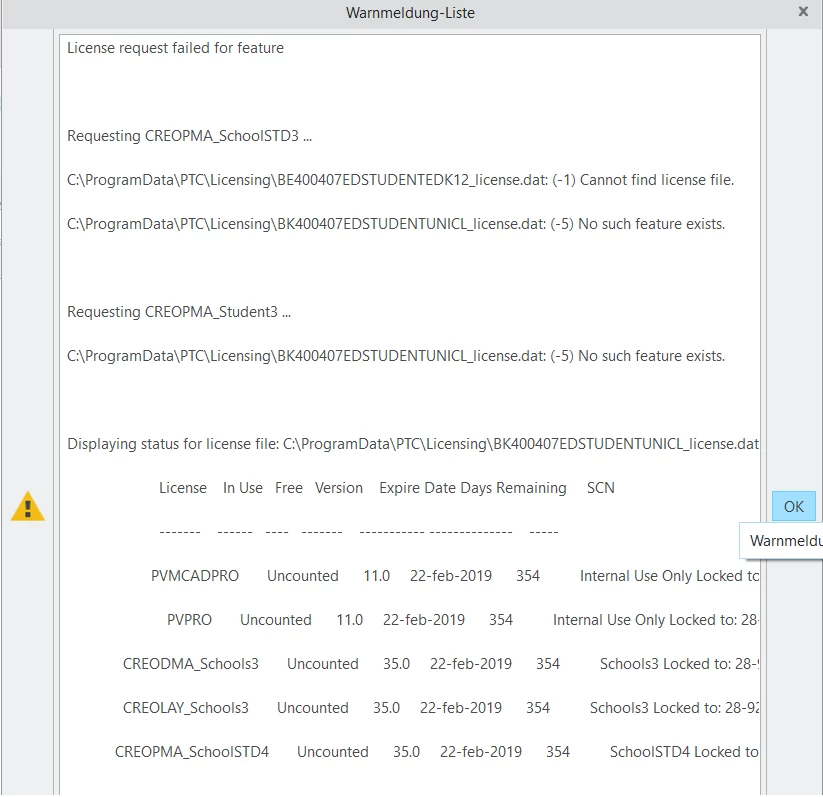
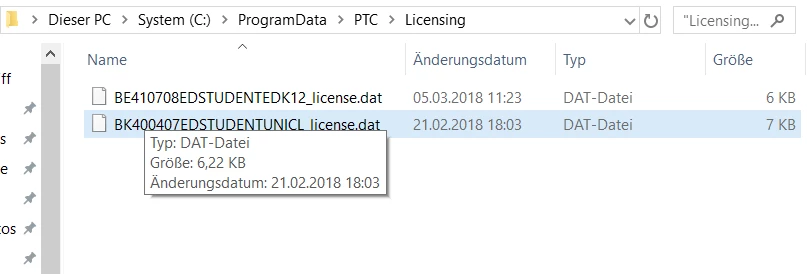
Pfad.pngWarnmeldungsliste.pngI ran the normal licensing process like its described in the pdf file you get after downloadig the creo 4 version for students.

When i open creo 4 it shows me the error attached (second picture).

Where did i fail during the installation?

Thank you for helping me out 🙂

1 reply

24-Ruby III
March 5, 2018

Hi,


if you want to use Creo 4.0, then


  • uninstall all Creo 4.0 items
  • remove installation directory, if it still exists
  • remove all license files from C:\ProgramData\PTC\Licensing directory
  • launch setup.exe from Creo 4.0 installation media
  • enter Product code

K-12       students can use Product code BE410708EDSTUDENTEDK12

University students can use Product code BK410705EDSTUDENTUNICL


1-Visitor
March 6, 2018

Fehler.png


Now I cant install the Licence at all ?

24-Ruby III
March 7, 2018

Hi,


I do not understand, why you are entering Product code BE410708EDSTUDENTEDK12 in situation when you have valid license file for Product code BK410705EDSTUDENTUNICL.