

3-Newcomer
August 26, 2023
Solved

Cant Acces Mathcad Prime 8.0 from home

  • August 26, 2023
  • 2 replies
  • 1879 views

Hi


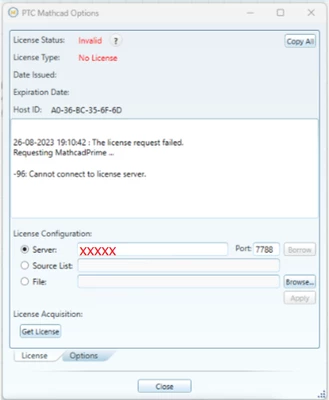
Im a student at a University. Our Mathcad license is network(IP?) based, which means i need to be on a VPN given to me by my university. However while being on the VPN and following every step in the installation guide it doesnt seem to work. I've even checked my IP while being on the VPN to make sure there wasn't any problems with it. Ive attached a picture of the VPN and the license status. I hope someone can help me with this. 
Best answer by MartinHanak

@MN_10766417 wrote:

Hi


Im a student at a University. Our Mathcad license is network(IP?) based, which means i need to be on a VPN given to me by my university. However while being on the VPN and following every step in the installation guide it doesnt seem to work. I've even checked my IP while being on the VPN to make sure there wasn't any problems with it. Ive attached a picture of the VPN and the license status. I hope someone can help me with this. 


Hi,

you entered wrong information into Server field.

MartinHanak_0-1693207367722.png


You have to know server name and server IP address.


Option 1.]

Enter IP address instead of my XXXXX

If it resolves your problem then you do not have to use following option.


Option 2.]

Add following line at the end of C:\Windows\System32\drivers\etc\hosts file

server IP address   server name

---

Enter server name instead of my XXXXX


2 replies

24-Ruby III
August 27, 2023

Articles:

24-Ruby III
August 28, 2023

Hi,

OP is student. He/she does not have access to PTC articles.

24-Ruby III
August 28, 2023

@MN_10766417 wrote:

Hi


Im a student at a University. Our Mathcad license is network(IP?) based, which means i need to be on a VPN given to me by my university. However while being on the VPN and following every step in the installation guide it doesnt seem to work. I've even checked my IP while being on the VPN to make sure there wasn't any problems with it. Ive attached a picture of the VPN and the license status. I hope someone can help me with this. 


Hi,

you entered wrong information into Server field.

MartinHanak_0-1693207367722.png


You have to know server name and server IP address.


Option 1.]

Enter IP address instead of my XXXXX

If it resolves your problem then you do not have to use following option.


Option 2.]

Add following line at the end of C:\Windows\System32\drivers\etc\hosts file

server IP address   server name

---

Enter server name instead of my XXXXX