
1-Visitor
December 2, 2025
Solved

Creo 10.0 Crashes

  • December 2, 2025
  • 1 reply
  • 165 views

Hi everyone,

I've been having this problem for a month and I have absolutely no idea how to fix it. It happens very often that when I have a .prt file or other file opened in Creo, it starts an infinite loading process that ends with the program forcefully closing. If I reopen Creo without opening the file, nothing happens, but when I open a file, it appears with a vertical black bar on the right side of the screen, starting the infinite loading process again. The only way I can fix it is to restart my PC. I checked my PC's system requirements, and they should be sufficient (I have an Asus Pro). I tried disabling Windows' antivirus, but nothing.
Thanks in advance.
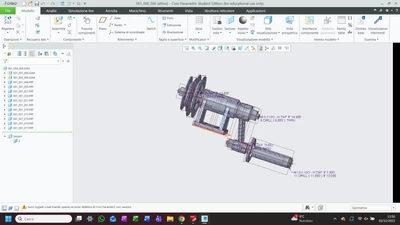
GB_14346111_0-1764679840543.png


Best answer by MartinHanak

Hi,

it looks like graphic card driver problem.

Test following procedure:

  • open config.pro file in Notepad
  • add following line at the end of config.pro file
    graphics win32_gdi
  • save config.pro file
  • start Creo and work for some time (take into consideration that Creo graphics to be slow to respond)

If your problem disappears then you will have confirmed that the problem is related to graphic card drivers. You have to install "right version" of graphic card drivers.

1 reply

24-Ruby III
December 3, 2025

Hi,

it looks like graphic card driver problem.

Test following procedure:

  • open config.pro file in Notepad
  • add following line at the end of config.pro file
    graphics win32_gdi
  • save config.pro file
  • start Creo and work for some time (take into consideration that Creo graphics to be slow to respond)

If your problem disappears then you will have confirmed that the problem is related to graphic card drivers. You have to install "right version" of graphic card drivers.