
1-Visitor
May 20, 2016
Solved

Creo 2.0 license problem

  • May 20, 2016
  • 1 reply
  • 1319 views

Hi everybody.

I'm using the Creo 2.0 Student version. Yesterday I installed Windows 10 on my computer (the previous operative system I had was Windows 7).

Until yesterday Creo 2.0 was working; after the upgrade to Windows 10 I got this problem: License request failed for feature.

I've already tried to do what written in http://apps.ptc.com/schools/references/support_reorder_network.pdf, but still I have this problem!

Is it possible to solve it even if I have installed Windows 10? What's the solution??
Thanks.
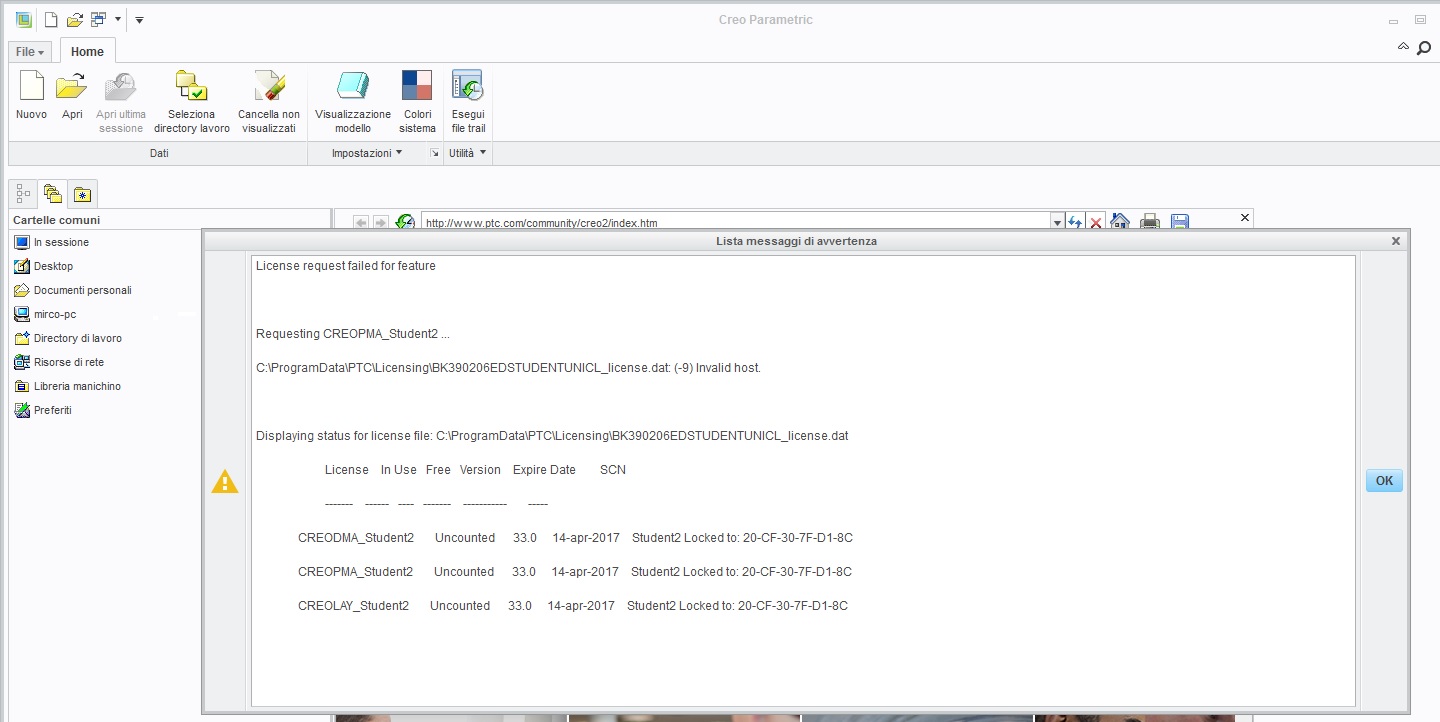
Immagine.jpg

    Best answer by MartinHanak

    Hi,

    your license file is generated for network card with MAC address 20-CF-30-7F-D1-8C. You have to check if this network card is enabled and running.

    BTW: Why did you install Windows 10 ?

    MH

    1 reply

    24-Ruby III
    May 20, 2016

    Hi,

    your license file is generated for network card with MAC address 20-CF-30-7F-D1-8C. You have to check if this network card is enabled and running.

    BTW: Why did you install Windows 10 ?

    MH