
1-Visitor
August 11, 2015
Question

creo 3.0 agent install error

  • August 11, 2015
  • 2 replies
  • 3068 views

I want to start out by saying I am installing 3.0 on a very old PC.  Creo 2.0 trial ran without issue.  3.0 opens and seems to run OK but after it is open for a few minutes I get the following pop up.  I have uninstalled and reinstalled.  Also, repaired installation.  No change.  Any ideas?  Is it due to browsers out of date? Thanks, Terry
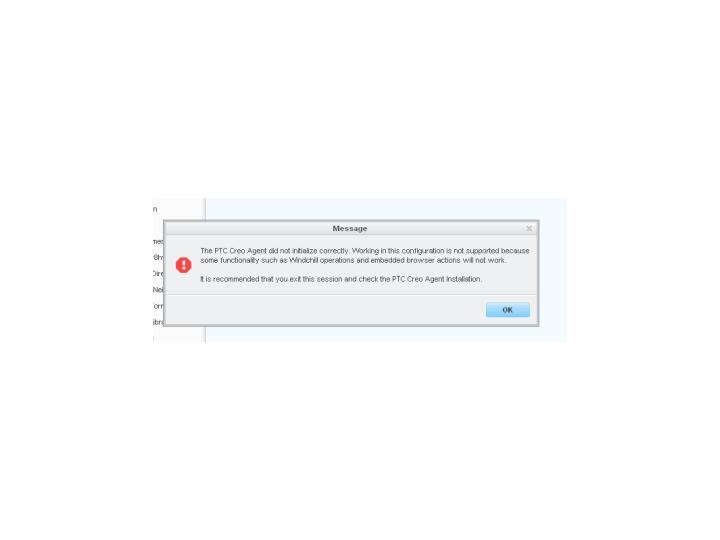
AgentError.jpg

    2 replies

    17-Peridot
    August 12, 2015

    Hello,

    First you should make sure that you uninstalled all PTC Creo 2.0 applications from your computer using Control Panel (also the old PTC Agent).

    It is important to read also the requirements of Creo 3.0 (in the installation folder you will find the ReadThisFirst.pdf). It might be an issue with the system.

    Please note that Creo 3.0 will not be running on XP.

    Thanks,

    Alex

    3-Newcomer
    September 26, 2015

    Hi

    Have you tried to set the path to the agent in the psf file??

    You might have a look at this:  PTC Creo Agent error

    Had similar issue after renaming folders - solved by adding / correcting this ENV

    ENV=CREO_AGENT_EXE_PATH=C:\PTC\CREO3\Creo\Platform\3.67\creoagent.exe