1-Visitor
February 22, 2018
Question

CREO 4 License problem after following the forum steps

  • February 22, 2018
  • 1 reply
  • 2202 views

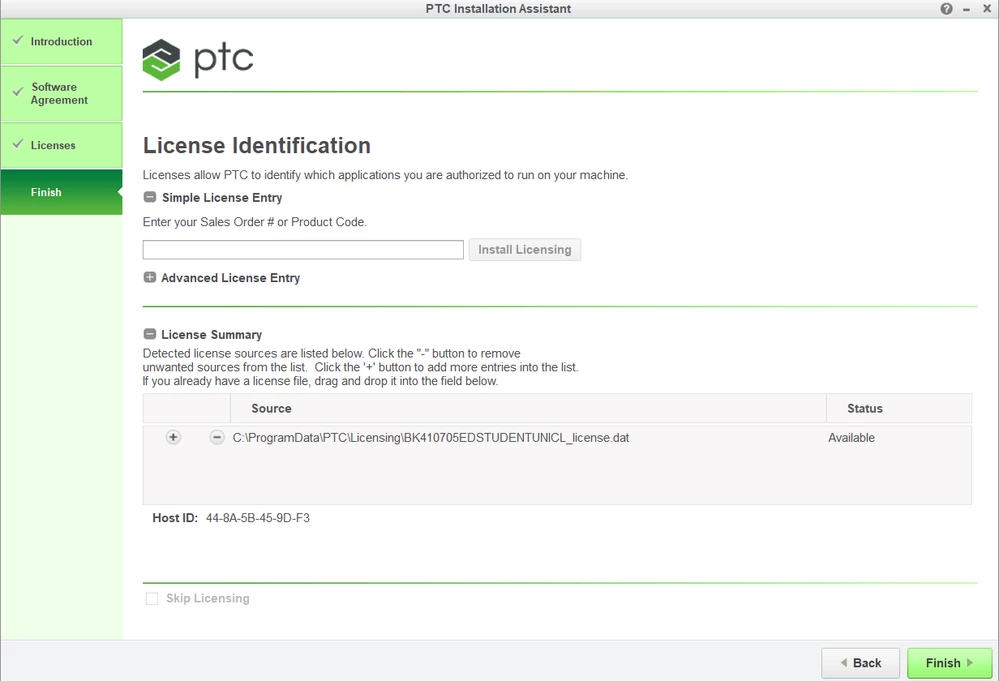
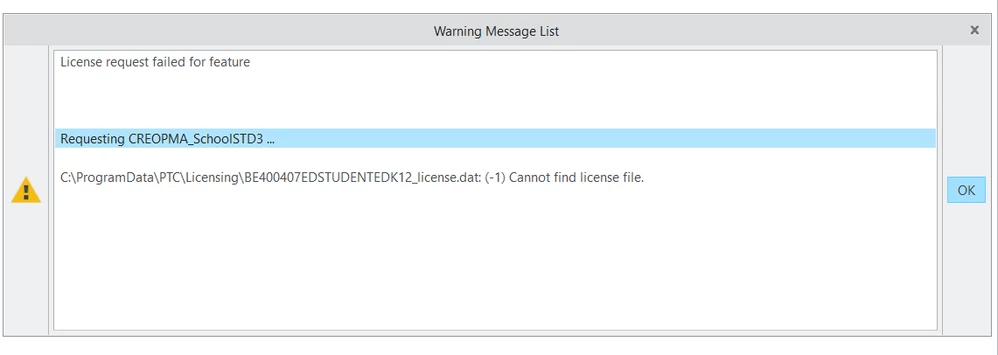
have deleted all my licenses, open the setup.exe, added the University students Product code BK41070..., close, run CREO and get this error every time.
 

delete1Capture.PNGdelete2Capture.PNGdelete3Capture.PNG


1 reply

24-Ruby III
February 22, 2018

Hi,


your current license file is ... C:\ProgramData\PTC\Licensing\BK410705EDSTUDENTUNICL_licence.dat


Creo is looking for ... C:\ProgramData\PTC\Licensing\BE400407EDSTUDENTEDK12_licence.dat


You have to go to Parametric\bin directory in your Creo installation and correct information written in parametric.psf file


ENV=PTC_D_LICENSE_FILE-= ... this line must contain path to license file


ENV=CREOPMA_FEATURE_NAME= ... this line must contain license name (see following example)

ENV=CREOPMA_FEATURE_NAME=CREOPMA_Student3 ()


1-Visitor
February 23, 2018

Ok... I have read all the thread here and followed all the directions and the software is telling me that everything is exactly what it is suppose to be. Creo still will not work. I get the license error like has been posted on all the threads. What do I do now? I have reload this software 5 times and nothing works? This installing procedure sucks no directions or anything explaining what to do. Been working on this for 2 days!

24-Ruby III
February 23, 2018

Hi,


it is a pitty that you did not attach picture of error message window.