

3-Newcomer
March 4, 2025
Solved

Creo Installation Assitant doesn't open

  • March 4, 2025
  • 1 reply
  • 691 views

I downloaded the needed, but when I try to open setup.exe, the creo installation assistant doesn't open
I turned off the antiviruses, and ran it as an administration, but it just doesn't open
The version of Creo I downloaded is 9.0 student edition
Best answer by MartinHanak

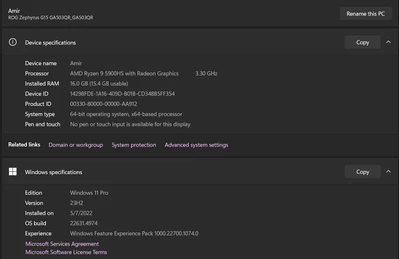
@AZ_10979403 wrote:

AZ_10979403_0-1741096071296.png

the laptops graphic card is nvidia 3070


Hi,

I do not see any problem.

1.] try asking Google ... windows 11 creo parametric 9.0 setup.exe

2.] run setup.exe from Command prompt window (path to setup.exe must not contain spaces and special national characters)

3.] open Event Viewer and look for error message related to setup.exe

1 reply

3-Newcomer
March 4, 2025

AZ_10979403_0-1741093869573.png

AZ_10979403_1-1741093891851.png

disabled all protection and deleted previous licenses, ran the setup.exe as an administrator and it just doesn't open


24-Ruby III
March 4, 2025

Hi,

please provide following information:

  • detailed hardware configuration
  • Windows version
3-Newcomer
March 4, 2025

AZ_10979403_0-1741096071296.png

the laptops graphic card is nvidia 3070