

1-Visitor
February 24, 2025
Solved

CREO installation config error

  • February 24, 2025
  • 2 replies
  • 720 views

Hi All,


I am having the following error when trying to install the CREO drawing standards, and cannot find anything online to help me. I have loaded it as 'administrator' so permissions arent an issue and cannot find any info no matter the amount of digging I do to find it. I guess what I need to do is find these files manually and then enter them into the correct config files manually? I dont know where to start as there are hundreds of files.


Thanks in advance!
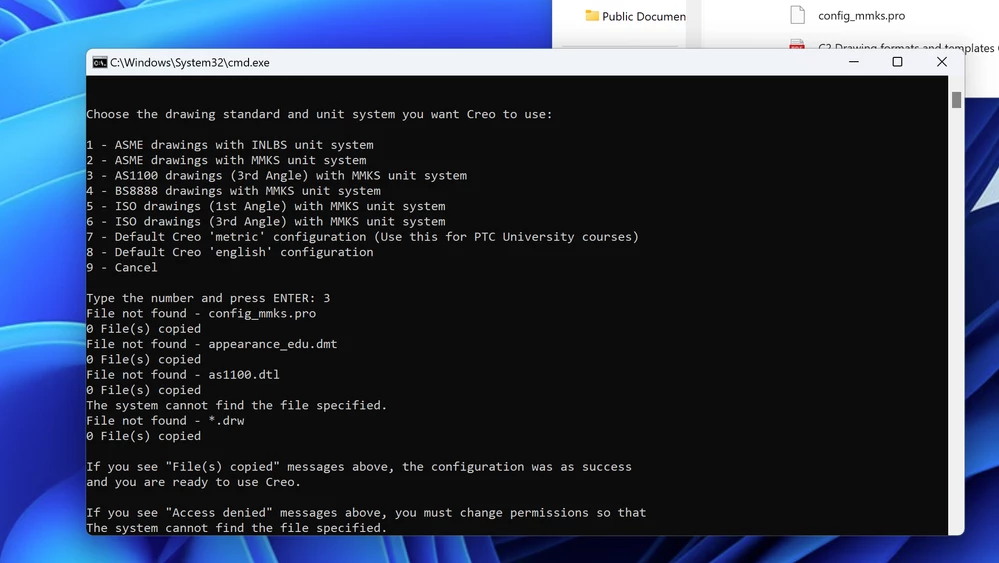
 

Screenshot 2025-02-24 at 5.49.19 pm.png

Best answer by VladimirN

Same issue:

2 replies

VladimirN24-Ruby IIIAnswer
24-Ruby III
February 24, 2025

Same issue:

1-Visitor
February 24, 2025

Thank you! I had to pretty much activate permissions all along the file chain instead of just inside Creo_standards

24-Ruby III
February 24, 2025

You're welcome.

24-Ruby III
February 25, 2025

Hi,

just FYI ... you do not have to install Creo to default directory C:\Program Files\PTC. You can create your own installation directory, for example C:\PTC, set Full access to it and install Creo to C:\PTC\Creo11 (for example).