
1-Visitor
Mar 31, 2012 12:32 PM UTC
Solved

Creo- Only toolbars visible

I have successfully downloaded Creo Parametric. All the icons on the toolbars appear to work but upon selecting sketch or anything the screen remains white, nothing is displayed. If I try to draw a line, the line is not visible on the screen. I have attached a print screen of what I can see.

Any help would be much appreciated,

-Sal
    Answer
    Apr 2, 2012 2:11 PM UTC

    Salvatore,

    To fix your problem, I would try the following options (in order):

    1. Update graphics driver? In most cases upgrading your driver will fix graphics issues.
    2. If updating your graphics driver doesn’t work, try changing your display settings from 32bit to 16bit.
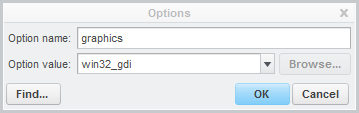
    3. If 1 and 2 above do not help, add the following config.pro option “graphics win32_gdi”. To do this click File> Options> Configuration Editor, the click Add. In the Option Name box, type "graphics" and in the Option Value box type "win32_gdi".

    graphics_win32_gdi.png

    3 replies

    24-Ruby IV
    Apr 2, 2012 11:58 AM UTC

    What Windows OS and video adapter are you using?

    Try to contact with PTC: -. Or use "Contact Support" here (you need to fill "PTC Academic Support Request Form"):

    http://www.ptc.com/go/academic-support

    http://www.ptc.com/company/community/creo/

    Translate
    Answer
    Apr 2, 2012 2:11 PM UTC

    Salvatore,

    To fix your problem, I would try the following options (in order):

    1. Update graphics driver? In most cases upgrading your driver will fix graphics issues.
    2. If updating your graphics driver doesn’t work, try changing your display settings from 32bit to 16bit.
    3. If 1 and 2 above do not help, add the following config.pro option “graphics win32_gdi”. To do this click File> Options> Configuration Editor, the click Add. In the Option Name box, type "graphics" and in the Option Value box type "win32_gdi".

    graphics_win32_gdi.png

    Translate
    1-Visitor
    Apr 24, 2012 3:52 AM UTC

    Thank you very much. I tried option 3 and it worked!

    Translate